How a Fake WinSCP Installer Loads Malware
Overview
The Broomstick campaign distributes malware by impersonating popular administrative tools such as WinSCP and PuTTY. WinSCP is a legitimate and widely trusted SFTP client (a program used to securely transfer files between a local computer and a remote server). Victims typically encounter the malicious installer through typosquatted domains, malicious advertisements (commonly known as malvertising), or SEO poisoning campaigns delivered through web browsers. In these campaigns, attackers manipulate search engine optimization techniques so their fake download pages appear near the top of search results for popular queries.
For example, when a user searches for “WinSCP download,” one of the top results may actually be a malicious website. Many users assume that the first few results are trustworthy, so they navigate to them without closely verifying the domain. In some cases, users are presented with multiple similar-looking websites and may accidentally choose the malicious one, unknowingly downloading a trojanized installer instead of the legitimate application. Attackers sometimes further tailor these campaigns to target specific users, such as system administrators and developers, making them more difficult to identify and defend against. Once executed, the trojanized installer deploys OysterLoader/CleanUpLoader, a malware loader that fetches and executes additional payloads from malicious actors infrasturcture.
OysterLoader has been observed in intrusion campaigns associated with the Rhysida ransomware group, a financially motivated cybercriminal operation known for targeting organizations through multi-stage attacks that often begin with seemingly legitimate software downloads. By disguising malware as widely used administrative tools, attackers increase the likelihood that technically skilled users such as developers and system administrators will execute the installer, granting the attackers access to systems that often hold privileged credentials and connections to critical infrastructure.
This strategy reflects a broader trend in modern cyber intrusions: abusing trusted software distribution channels to gain initial access. By compromising the tools that administrators rely on, attackers can expand their foothold inside networks and potentially move laterally into sensitive environments. Similar tactics have been observed in major supply chain incidents such as the SolarWinds supply chain attack, where trusted software distribution channels were abused to reach downstream victims.
Fingerprint & Threat Intel
SHA-256
9ac7c82eba9200fb11ac047bf259f30d4e6929e1f8a472557a3a81cdd1a492db
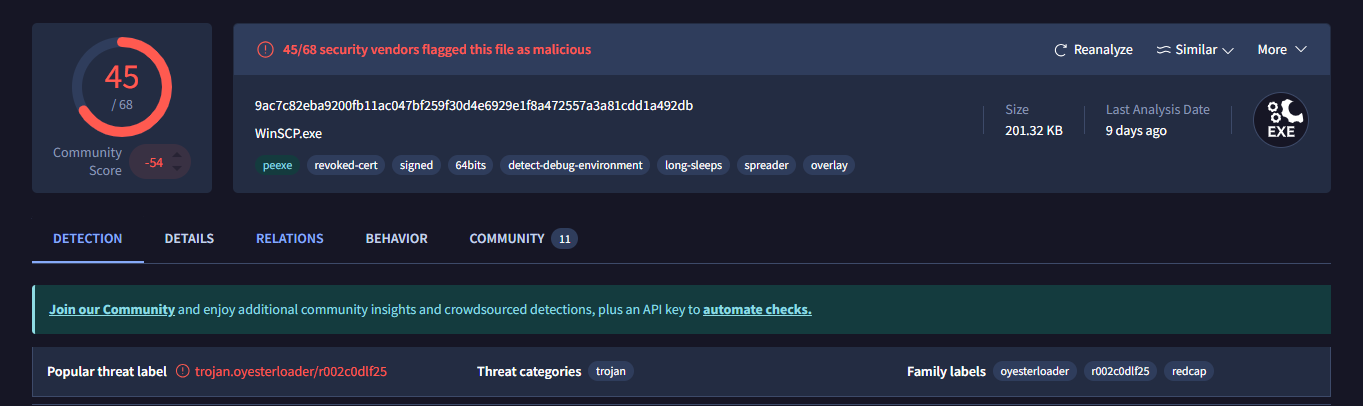
It is a signed 64-bit executable. A digital signature is a certificate attached to a binary as a claim of authenticity, issued by a trusted Certificate Authority (CA) such as DigiCert. Windows uses these certificates to verify the binary has not been tampered with and the publisher identity shown in UAC (User Account Control) prompts. Without one, Windows SmartScreen displays an "Unknown Publisher" warning dialog.
The certificate on this binary has been revoked, meaning the CA invalidated it. Most likely because it was stolen or the private key was compromised. Revocation is checked at runtime via CRL (Certificate Revocation List) or OCSP (Online Certificate Status Protocol). A revoked cert still technically signs the file, but any system performing a revocation check will flag it. Attackers obtain stolen certs to bypass the initial SmartScreen warning — by the time the revocation is caught, the binary may have already executed.
The binary also exhibits sandbox and debugger detection. This shows up in the import table through functions like IsDebuggerPresent CheckRemoteDebuggerPresent, and NtQueryInformationProcess - all Windows API calls specifically designed to query the execution environment. If a debugger or sandbox is detected, the malware alters or halts its behavior entirely. It pairs this with long sleep calls — invoking Sleep() function for a period of time. Automated sandboxes typically time out after a few minutes, so the malware simply waits them out, appearing benign until analysis stops.
It also has spreading capability, meaning it contains logic to infect other hosts, copying itself to network shares or other reachable machines. Finally, it uses a PE overlay: data appended after the defined end of the PE file. Legitimate programs use it for Self-Extracting Archives. Malware might use it to hide encrypted payloads, C2 addresses, encryption keys, or shellcode. The overlay is invisible to the PE loader but fully readable on runtime by the program. Still remains visible to static analysis tools like PE Studio without executing the file.
It poses as WinSCP.exe (Windows Secure Copy), a legitimate program used to securely transfer files to and from remote servers over SFTP/SCP. Legitimate WinSCP is located at C:\Program Files (x86)\WinSCP\, if the binary exists elsewhere, that alone is a red flag. A legitimate WinSCP binary also carries a valid, unrevoked certificate from its actual publisher. This one does not, which means we are dealing with a trojan. This is dangerous, WinSCP stores server credentials and session configurations, so an attacker now has access to your remote servers through your saved credentials and sessions. They can steal data, move deeper into the network, plant more backdoors, or tamper with builds and push malicious updates to downstream systems. In short, they have the keys to the kingdom.
Static Analysis
Static analysis through DIE and PE Studio revealed the following:
The binary targets Windows Vista+ (Vista plus any Windows OS released after it) on AMD64 and was compiled from C/C++ to 64-bit assembly.The DOS stub has been customized - (Heuristic) Protection: Generic [Custom DOS], DIE can't tell what protection has been used but there is something non-standard about it, which is unusual since most binaries just carry the default "This program cannot be run in DOS mode" message. In our scenario as we can see from the image below it just contains null bytes - 00, therefore no data is being hidden there.

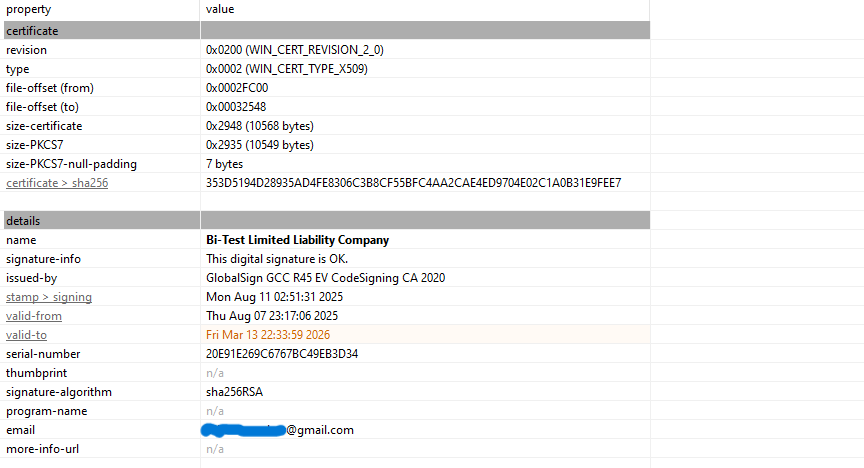
The overlay in this sample contains the Windows Authenticode signature, stored as a PKCS #7 blob. PKCS #7 is a standard format for cryptographic messages, in this case, it includes the certificate chain, signer information, and timestamps that allow Windows to verify the file’s authenticity. The 10,568-byte overlay observed by DIE is therefore just the binary’s certificate, not a hidden payload. It sits past the PE boundary, which is exactly where Authenticode signatures are stored, making this perfectly normal for signed PE files.
The notable imports are:
LoadLibraryA,GetProcAddress— dynamic API resolution to mask what the binary really doesVirtualAlloc,VirtualProtect— memory allocation and permission changesInternetOpenW— sets up an internet connection
From these imports we can see the binary uses dynamic API resolution to hide its real functionality from static analysis, it allocates memory and makes it executable which is a common pattern for loading and running code in memory, and it reaches out to the internet. The follow-up network calls like InternetConnectW or HttpOpenRequestW are probably resolved at runtime through GetProcAddress, which is why they don't show up in the import table.
Attack Chain
The attack chain makes total sense when you think about it: Trojanized WinSCP → targets sysadmins and developers, people who actually manage servers. Not random users, they're going after people with keys. It acts as a Spreader → once on that machine, why stop there? Lateral movement across the internal network. If one dev's machine is compromised, their colleagues' machines, shared build servers, internal tools; all reachable. Server access via stolen WinSCP credentials/sessions → now they're not just on your machine, they're on your infrastructure. On a server they are essentially root. If you control the server that ships software updates or build artifacts, you can push a malicious update to every downstream customer. One compromised developer or infrastructure server can become a distribution point for thousands of other victims. Organizations routinely trust software updates and administrative tools provided by vendors, meaning that once an attacker infiltrates that trusted channel, the malicious code is effectively delivered under the guise of legitimacy.
This strategy to some extent mirrors the approach seen in major supply chain compromises such as the SolarWinds supply chain attack, where attackers infiltrated the build environment and inserted a backdoor (known as Sunburst/Solorigate) into legitimate SolarWinds Orion software updates. Those compromised updates were then distributed to thousands of organizations, including government agencies and major technology companies. In many cases, additional payloads were only deployed after the attackers determined that a compromised organization was a high-value target.
Runtime Behavior
During Dynamic analysis through tools such as Procmon, INetSim and Wireshark we got a glimpse of how the loader prepares the environment:
Persistent DLL Sideloading Attempt. The binary aggressively attempting to CreateFile for several system DLLs such as (wininet.dll, IPHLPAPI.DLL, iertutil.dll) in the Desktop folder (the execution directory). The result: NAME NOT FOUND. I believe this is a DLL Search Order Hijacking attempt. The malware is looking for a malicious version of these libraries in its own folder before falling back to C:\Windows\System32. My theory is these libraries might be part of the files or payload being dropped so the binary can use them instead of the legitimate ones. Even though its failing we can anticipate a second stage payload to use those libraries.
In INetSim and Wireshark the network logs show an intensive volume of OCSP and CRL traffic (Certificate Revocation Checks). It repeatedly reaches out to DigiCert and VeriSign endpoints. I found the volume of these requests paired with constant fetches of disallowedcertstl.cab (the Windows "Blacklist") to be quite overwhelming and considered maybe they serve a dual purpose to clutter the traffic while also trying to verify the binary. Looking closer, we observed several public IPs being queried by the loader. At first glance, these appear as network noise, but they provide more information into the malware’s infrastructure.
The queries were PTR (Pointer) records, used for reverse DNS lookups. Unlike normal DNS, which resolves a hostname to an IP address, PTR records resolve an IP address back to its associated hostname. In IPv4, reverse lookups are typically represented in the special in-addr.arpa domain, where the octets of the IP are reversed. For example: 89.18.213.194.in-addr.arpa → 194.213.18.89. Below we can see the IP addresses the loader tries to reach out to:
2026-0x-xx 10:23:17 DNS connection, type: PTR, class: IN, requested name: 89.18.213.194.in-addr.arpa2026-0x-xx 10:23:54 DNS connection, type: PTR, class: IN, requested name: 113.53.239.85.in-addr.arpa2026-0x-xx 10:24:46 DNS connection, type: PTR, class: IN, requested name: 135.119.28.185.in-addr.arpa2026-0x-xx 10:31:37 DNS connection, type: PTR, class: IN, requested name: 250.255.255.239.in-addr.arpa2026-0x-xx 10:46:47 DNS connection, type: PTR, class: IN, requested name: 89.18.213.194.in-addr.arpa2026-0x-xx 10:47:35 DNS connection, type: PTR, class: IN, requested name: 113.53.239.85.in-addr.arpa2026-0x-xx 10:48:26 DNS connection, type: PTR, class: IN, requested name: 135.119.28.185.in-addr.arpa
These IPs are likely part of the C2 infrastructure used to download the second-stage payload. Analyzing their hosting and registration information provides additional context:
| IP | Organization | Registration / Location | Notes |
|---|---|---|---|
| 85.239.53.113 | JSC "TIMEWEB" (TW-Cloud) | Saint-Petersburg, Russia | Timeweb is a large Russian hosting provider; likely leveraged by malicious actors because it is outside Western law enforcement jurisdiction |
| 194.213.18.89 | BlueVPS OU (EE-BLUEVPS) | Corporate: Tallinn, Estonia; Physical: Ashburn, VA & Los Angeles, CA, US | Offshore VPS provider renting servers globally; likely used to blend with US traffic for evasion |
| 185.28.119.135 | BlueVPS OU (EE-BLUEVPS) | Corporate: Tallinn, Estonia; Physical: Ashburn, VA & Los Angeles, CA, US | Same as above; illustrates geographic dispersion to bypass geo-restrictions |
Using hosting providers in Russia and Estonia, with some servers physically located in the United States, is a tactic commonly employed by malicious actors to mix in with normal regional traffic and evade simple geolocation-based blocking. This is the point where the loader's "mask" slips. These aren't standard Microsoft or update servers. This is the Command & Control (C2) infrastructure.
BlueVPS OU is an offshore VPS (Virtual Private Server) provider registered in Estonia that rents virtual servers to clients worldwide. You can rent a server from them while relying on Estonia's privacy laws. However, when you rent the server, you can choose to have it physically spun up in a data center in the US. Attackers do this to blend in. If a network admin at a US company sees a PC talking to Estonia or Russia, they might block it immediately via Geo-IP blocking. But if the PC is talking to an IP in Ashburn, Virginia it looks like normal, legitimate web traffic. The server in Virginia then acts as a proxy, secretly routing the stolen data back to the attackers. So it's Estonian-registered, US-hosted, Russian-controlled infrastructure.
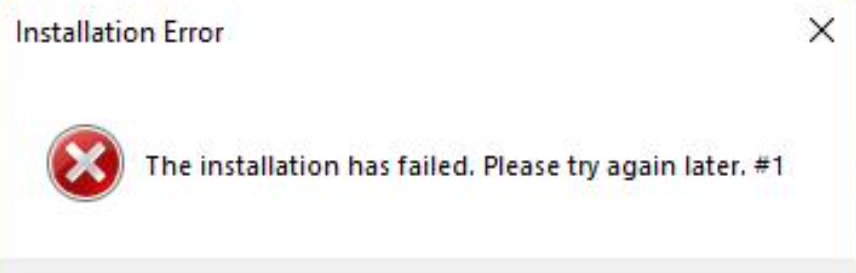
Interestingly, other OysterLoader samples in some threat reports show an almost similar IP within the same subnet such as - 85.239.53.66, which resolves to the domain funkyfirmware.com, that is likely the domain holding the payload. While I couldn't resolve that domain from my sample, the close similarity of IPs across the samples likely means that these are part of the same C2 infrastructure, I am not certain of this but i have a strong hunch. It confirms that even when a loader seems "quiet" and is buried in certificate validation noise, the clues to its true destination are often hidden in plain sight within the network metadata. When I run the sample the only visual response i get is this error message box.
IOCS
85.239.53.113185.28.119.135194.213.18.899ac7c82eba9200fb11ac047bf259f30d4e6929e1f8a472557a3a81cdd1a492db
TTPs
| Tactic (ATT&CK) | Technique ID | Technique Name | Observed Behavior / Mapping |
|---|---|---|---|
| Initial Access | T1189 | Drive-by Compromise | Victims are redirected to download a trojanized WinSCP installer through SEO poisoning and malvertising campaigns. |
| Defense Evasion | T1574.001 | DLL Search Order Hijacking | The binary repeatedly attempts to load system DLLs (e.g., wininet.dll, IPHLPAPI.dll, iertutil.dll) from the execution directory before falling back to C:\Windows\System32. |
| Discovery | T1016 | System Network Configuration Discovery | The loader performs multiple DNS queries, including PTR lookups, likely to understand the host network environment. |
| Command and Control | T1071.004 | Application Layer Protocol: DNS | DNS queries are used to resolve infrastructure and perform reverse lookups against external IP addresses. |
| Command and Control | T1095 | Non-Application Layer Protocol | Repeated TCP connection attempts to external IPs suggest attempts to establish communication with attacker-controlled infrastructure. |
Conclusion
In this analysis I examined a trojanized WinSCP installer that reveals the OysterLoader malware. While the application appears legitimate at first glance, the binary contains loader functionality that attempts to contact domains and retrieve an additional payload. During dynamic analysis several behaviors stood out. The binary repeatedly attempted to resolve external IP addresses through PTR lookups and made multiple TCP connection attempts toward remote infrastructure. As we've seen malware distribution increasingly relies on SEO poisoning and fake software downloads, tricking users into clicking malicious links that appear at the top of search results. This shows that any widely used tool can be weaponized when attackers push modified installers through malicious or typosquatted websites.
The loader also showed behavior consistent with DLL search order hijacking. The executable attempted to load several Windows libraries from the current working directory before falling back to the legitimate system locations in C:\Windows\System32. This technique is commonly used by malicious loaders to execute attacker-controlled DLLs if they are present in the same directory as the executable. One server was associated with a Russian hosting provider, while the others were registered to an Estonian VPS provider with infrastructure physically located in the United States. Hosting infrastructure across multiple regions is a tactic often used by malicious actors to blend in with legitimate traffic and reduce the likelihood of simple geo-blocking defenses.
A full attack chain will be available when i investigate the payload dropped in the next blog. I’m looking into building a tool that helps users make better decisions and avoid getting side-tracked into malicious sites despite them getting top-ranked, maybe train a model of sorts and deliver it as a browser extension or a bot that is easy to use and proactive, providing real-time alerts about suspicious domains (i don't know what i will base this on but we'll see). This was fun looking forward to the next one. If you want a detailed blog on Oysterloader in full check out this sekoia blog, they have done a thorough impressive job with the analysis; https://blog.sekoia.io/oysterloader-unmasked-the-multi-stage-evasion-loader/