The .NET Library That Isn't: Inside OysterLoader's Stage 2 Payload
Overview
Analysis of Stage 2 payload of OysterLoader. This specific sample is a DLL that attempts to establish a foothold while evading detection, by masquerading as a legitimate Microsoft .NET library, specifically Microsoft.AspNetCore.Cors, a library used by web servers to define which external domains are permitted to access their resources.
A Dynamic Link Library (DLL) is a shared library of functions that multiple programs can use simultaneously, rather than each program bundling its own copy. Because they are designed to be loaded by other programs, they require a host executable to run, they cannot execute on their own. This design makes them a common target and vehicle for several well-known attack techniques:
- DLL Hijacking: An attacker places a malicious DLL with the same name as a legitimate one in a location the system searches before the real DLL's location. The system loads the malicious one first.
- DLL Side-Loading: Similar to hijacking , a malicious DLL is placed in an application's directory, exploiting the trust the application has in its own folder.
- DLL Injection: Malicious code is injected directly into a running process via a DLL, allowing it to execute within the context of a trusted application.
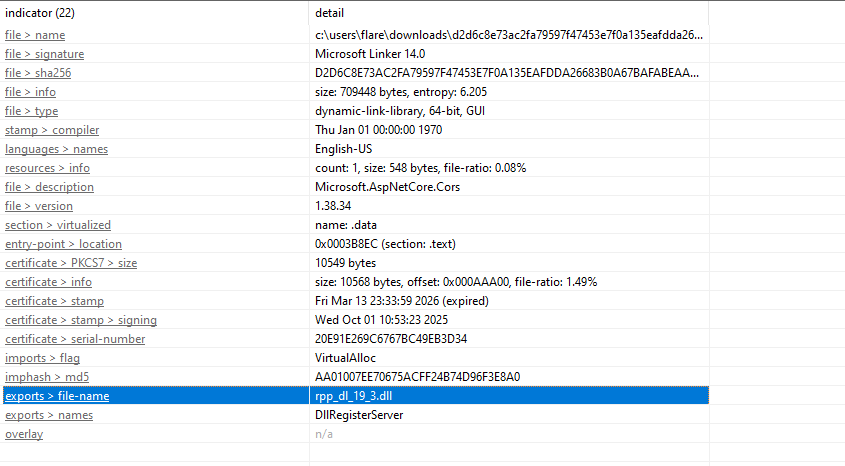
This analysis uncovered significant file metadata contradictions and masquerading techniques used to hide a native malicious binary in plain sight.
Fingerprint & Threat Intel
- SHA-256:
d2d6c8e73ac2fa79597f47453e7f0a135eafdda26683b0a67bafabeaa2f9d495 - Internal File Name:
rpp_dl_19_3.dll - Claimed File Identity:
Microsoft.AspNetCore.Cors
The threat intelligence profile is consistent with the Stage 1 OysterLoader , showing indicators for long sleep intervals, spreader capabilities, and VM/sandbox detection. The key difference here is the file type: the previous loader was an .exe; this sample is a .dll.
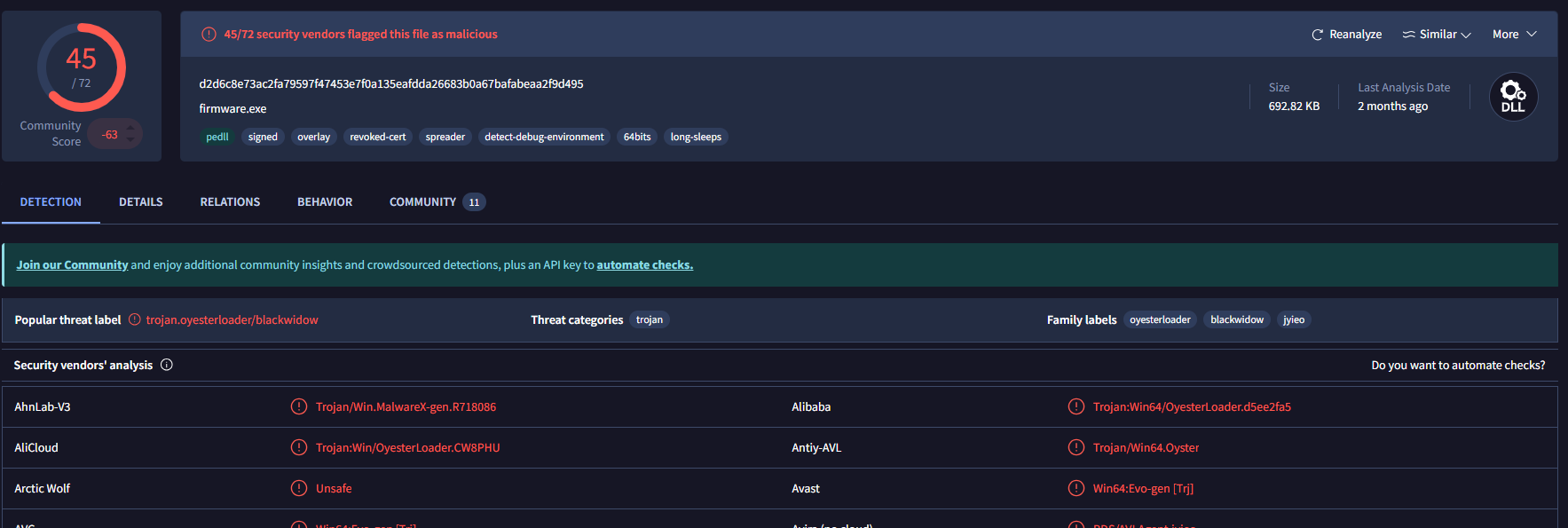
Static Analysis: The Red Flags
The file metadata provides an immediate trail of red flags. I have not seen these many red flags when doing static analysis, normally i am forced to do dynamic analysis to see what is really happening, but not to underestimate the sample, we will later see that the code is actually setup in a manner to throw off static code analysis.
1. The Metadata Mismatch
The binary claims to be Microsoft.AspNetCore.Cors, but the internal details tell a completely different story:
- Copyright Conflict: The copyright field points to Markus F.X.J Oberhumer , an expert in LZO data compression , rather than Microsoft Corporation. For an official Microsoft library, this is a clear sign of a hijacked metadata template.
- Company Name: Instead of "Microsoft Corporation," this field reads "TMRegEx32" , not a company name at all, but a common library file (TMRegEx32.dll) used for regular expressions. It appears the attacker was throwing technical-sounding terms into a metadata template without much thought.
- Internal DLL Name: The binary exports the internal name rpp_dl_19_3.dll. A genuine Microsoft library would have its internal and external names match.
- Original Filename: The original filename field has also been erased , another indicator of deliberate metadata manipulation.
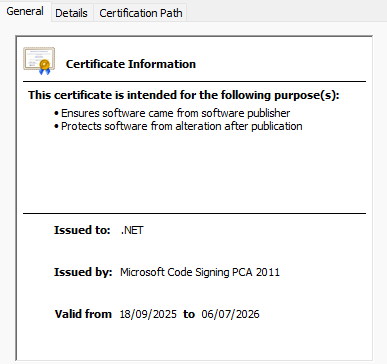
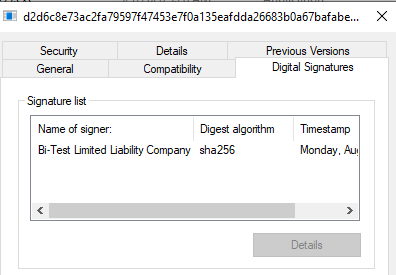
- Digital Signature: The binary is signed by Bi-Test LLC rather than Microsoft Corporation. For any official system library, a signature from anyone other than Microsoft is an immediate red flag.
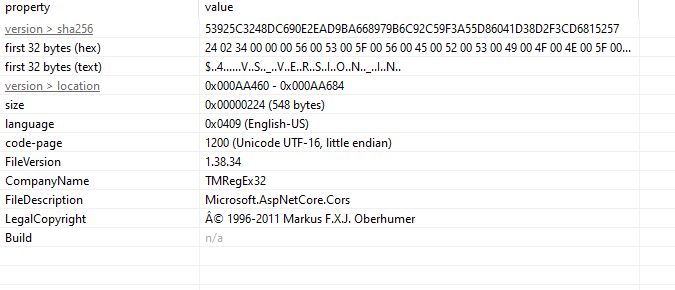
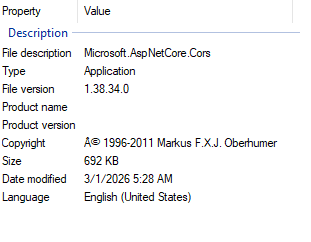
The contrast becomes even clearer when compared against a legitimate AspNetCore.Cors library , the metadata fields align correctly, and the certificate is issued by Microsoft. None of that holds true here.
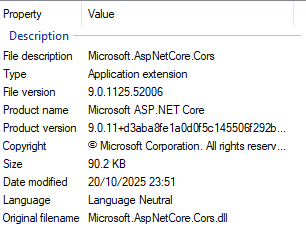
2. Architecture: Native vs. .NET
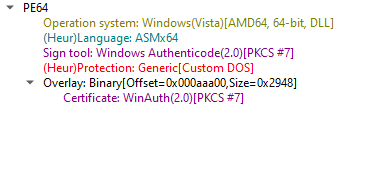
For a binary claiming to be part of the .NET ecosystem, the expected language would be Microsoft Intermediate Language (MSIL) , the universal compiled format for .NET binaries. Instead, DIE identifies this as Asmx64 (native C/C++). Real .NET libraries are compiled to MSIL and JIT-compiled at runtime by the .NET runtime. Seeing native x64 assembly here means this DLL is a native executable wearing .NET skin , it has no actual .NET code inside it.
Evasion and Behavioral Mapping
Using Capa, the binary's capabilities were mapped against the MITRE ATT&CK framework. The sample is loaded with anti-analysis and memory manipulation features.
- Sandbox Evasion: The binary contains anti-VM and sandbox behavior checks, this includes repeated cursor position polling , a common technique to detect automated analysis environments where the mouse never moves.
- Dynamic API Resolution: Rather than listing its imported libraries in the Import Table, the binary resolves its DLL dependencies at runtime. This hides its true capabilities from static scanners that rely on the import table for behavioral hints.
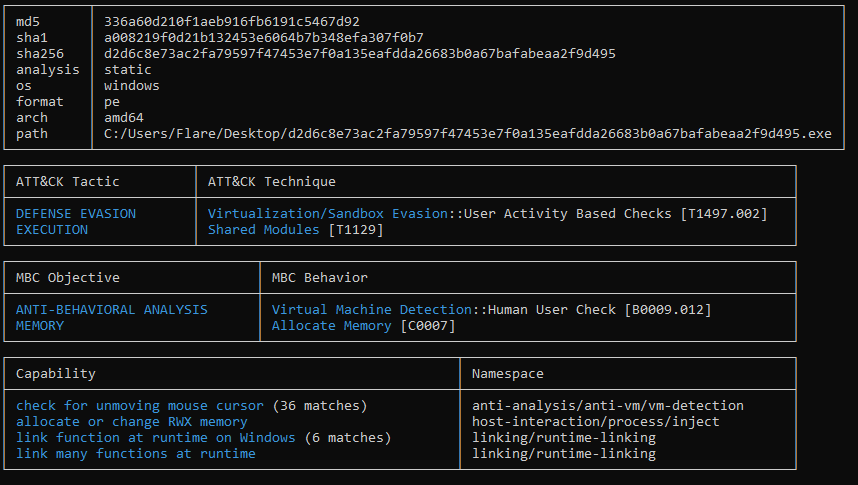
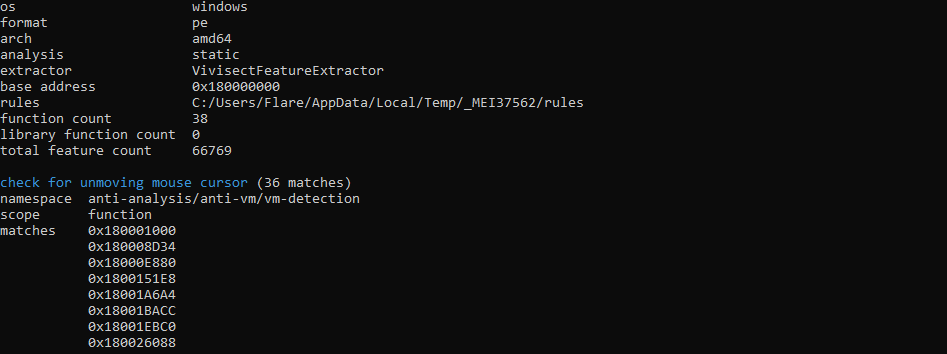
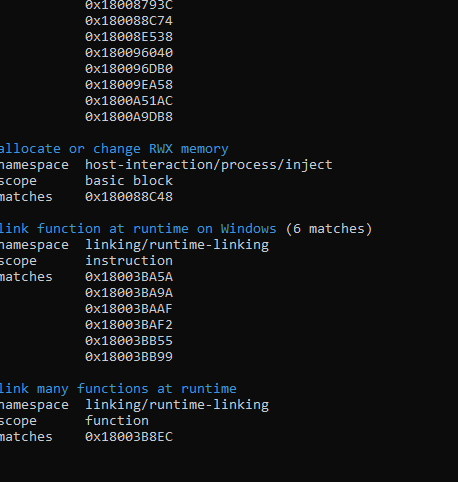
One of the most significant findings is that the binary performs RWX (Read, Write, Execute) memory allocations. To understand why this matters, it helps to understand how modern operating systems handle memory.
Understanding Memory Sectioning
Compiled native binaries divide memory into distinct zones:
- Writable Zones (.data, .rdata, .rsrc, .reloc): Used for variables, constants, and assets. Data here can be modified, but the OS will not execute it as code.
- Executable Zones (.text): This is where the actual code instructions live. It can be executed, but the OS will not allow writes into it.
This separation is known as the Write XOR Execute (W^X) rule. If a program attempts to execute code from a writable zone, the OS triggers a segmentation fault or access violation and terminates the process.
Why RWX
Historically, memory was RWX by default, which made buffer overflow attacks trivial , overflow a buffer into neighboring memory and execute whatever data you pushed in. Modern operating systems closed that door.
To work around the W^X rule today, a binary must explicitly request an exception by asking the OS for a new memory block with RWX permissions using functions like VirtualAlloc or VirtualProtect. There are legitimate use cases , JIT compilation in JavaScript, Java, and .NET runtimes being the primary example, and some packers unpacking compressed code at runtime. In this sample, however, the RWX allocations are being used to conceal the binary's real code until runtime, keeping it invisible to static analysis tools.
On Windows, W^X is enforced primarily through Data Execution Prevention (DEP), complemented by Address Space Layout Randomization (ASLR), which randomizes memory zone locations on every execution , making it significantly harder to predict where injected code will land.
Understanding the Exported DLL - COM OR NON-COM
Looking at the exports, the binary surfaces a single function: DllRegisterServer. To understand what this means, i think it helps to understand the difference between COM and Non-COM DLLs. COM DLLs (Component Object Model) use Microsoft's system that allows different programs to communicate using objects rather than simple functions. A COM DLL registers itself with the Windows Registry - telling Windows: "If any program needs an object that handles this specific function, reach out to me via my ID." COM DLLs are identified by a CLSID (Class Identifier), a unique ID stored in the registry that maps to the DLL's file path.
Every legitimate COM DLL exposes two standard exports:
- DllRegisterServer - the install button. Conventionally, this is what writes the DLL's CLSID and file path into the Windows Registry, making it reachable by other programs.
- DllUnregisterServer - the uninstall button. This removes the DLL's registry entry cleanly.
Non-COM DLLs are simpler, they are libraries of named functions. A program that needs a specific capability calls that function by name from the DLL directly. Non-COM DLLs are typically loaded by their parent executable or via rundll32.exe. This binary exposes DllRegisterServer but not DllUnregisterServer, which on the surface looks like a COM DLL. However, it is important to note that regsvr32.exe simply calls whatever code lives inside DllRegisterServer, what that function actually does is entirely up to the developer. The registry write is a convention, not a guarantee.
Dynamic Analysis
I used regsvr32.exe to run it inside x64dbg while setting breakpoints on the wininet.dll API library calls. When loaded in IDA, the binary's code appears dominated by graphics-related functions , palette creation, brush operations, and similar GDI calls. On the surface the code makes it look like a graphics utility. But the behavior observed at runtime tells a different story.
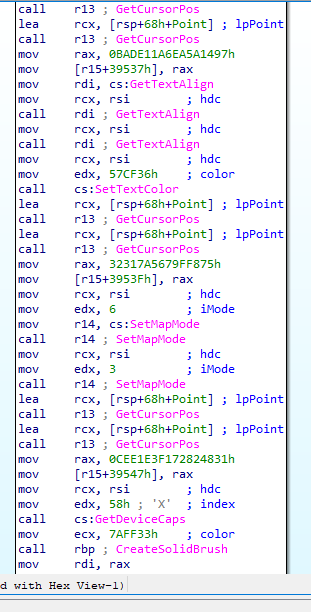
The binary is using the static code as a decoy layer while the actual payload is written into an RWX memory region that we are about to see in the DllRegisterServer code snippet and executed from there at runtime , making the "real" code invisible to static analysis.
DllRegisterServer: Entry Point Into the Payload
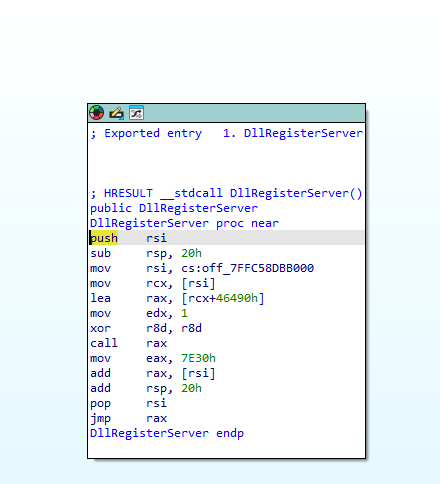
DllRegisterServer is the first function regsvr32.exe calls when it loads a DLL. That is its entire job, call that one function and trust the DLL to handle the rest. So whatever code lives inside DllRegisterServer is the first thing that executes. Here is the full function with what each line is doing:
push    rsi                          ; save rsi, about to overwrite it
sub     rsp, 20h                     ; allocate shadow space (standard prologue)
mov     rsi, cs:off_7FFC58DBB000    ; load global pointer, rsi now points to the payload base address
mov     rcx, [rsi]                   ; dereference, now rcx = base address of the unpacked payload
lea     rax, [rcx+46490h]            ; rax = base + 0x46490, first entry point into the payload
mov     edx, 1                       ; 2nd argument passed to payload
xor     r8d, r8d                     ; 3rd argument = 0
call    rax                          ; call into the payload at that offset
mov     eax, 7E30h                   ; load second offset
add     rax, [rsi]                   ; rax = base + 0x7E30 — second location inside the payload
add     rsp, 20h                     ; stack cleanup
pop     rsi                          ; restore rsi
jmp     rax                          ; tail call for execution
What this does is read a global pointer to the payload base address, calculate two offsets into it, call the first one with specific arguments, and tail-call the second. DllRegisterServer is a launchpad, and regsvr32 is the one that pulls the trigger unknowingly. That global pointer - off_7FFC58DBB000, is pointing at the RWX memory region the binary allocated earlier. That is where the real payload was written and that is what gets jumped into. The RWX allocation and this function are two halves of the same trick: write the payload somewhere executable, store the address, and retrieve it when the entry point fires.
rpp_dl_19_3.dll  ← THE FILE. This IS the malware.
│
├── Fake graphics code (CreateSolidBrush, CreatePalette...)
│     └── This is the CAMOUFLAGE. It's what you see in IDA statically.
│           It's there to fool analysts into thinking it's harmless.
│
├── DllRegisterServer
│     └── This is the TRIGGER. It's the entry point.
│           Not the malware itself, just the front door.
│
└── Unpacked RWX payload (only exists at runtime)
      └── This is the ACTUAL MALICIOUS LOGIC.
            The networking, the C2 beaconing, everything.
            It gets written into memory when the DLL runs.
Network Behavior: The Four Domains
During dynamic analysis, the binary was observed making outbound connection attempts to four domains:
funkyfirmware.comdaringdatadaredevils.comcyberneticodyssey.comdatadrivendreamers.com
The connection pattern is consistent across all four: the binary cycles through them in sequence, hitting each domain three times before moving to the next. For each attempt, it calls three WinINet API functions in order:
- InternetOpenW - Initializes a WinINet session. This is the equivalent of opening a browser handle; the program is telling Windows it intends to communicate over the internet. As you can see from the images above it tries opening a browser session.
- InternetConnectW - Establishes a connection to a specific server. This is where the target host and port are defined.
- HttpOpenRequestW - Opens an HTTP request to a specific path on that server. The binary is hitting what appears to be an /api/check endpoint. After calling HttpOpenRequestW, there is approximately a 20-second delay before the sequence resets back to InternetOpenW.
In the strings section i also observed some even more interesting things but once i have improved my RE skills i will get back on it. There is a lot to unpack, I also tried dumping the memory of the running dll but when loaded onto ida it shows the exact same graphical calls.
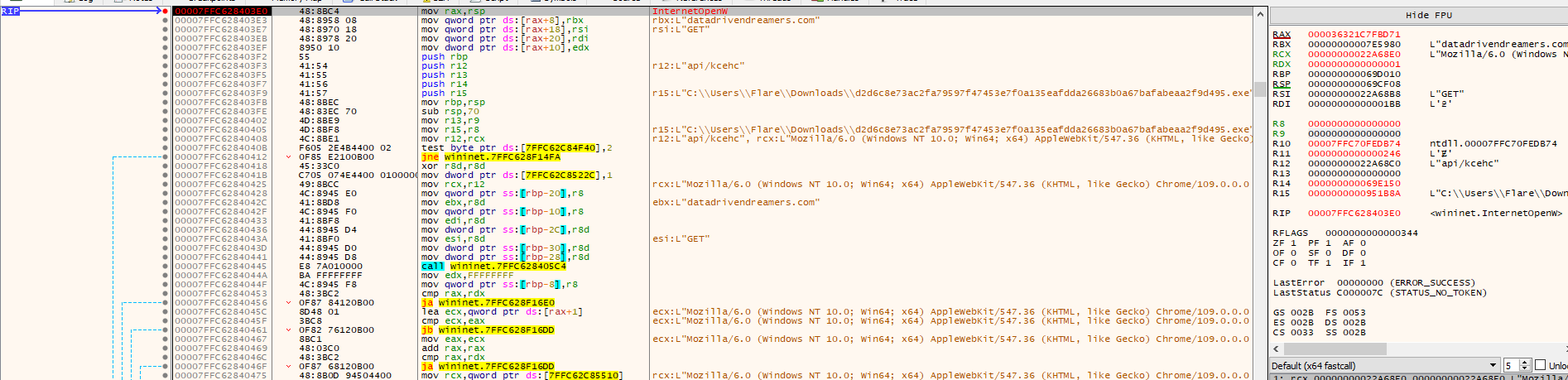
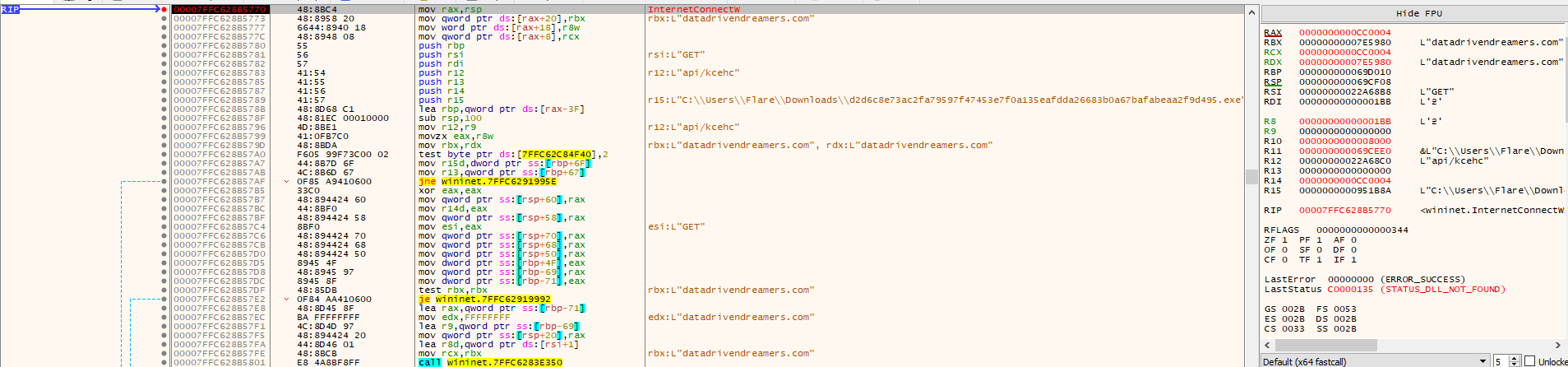
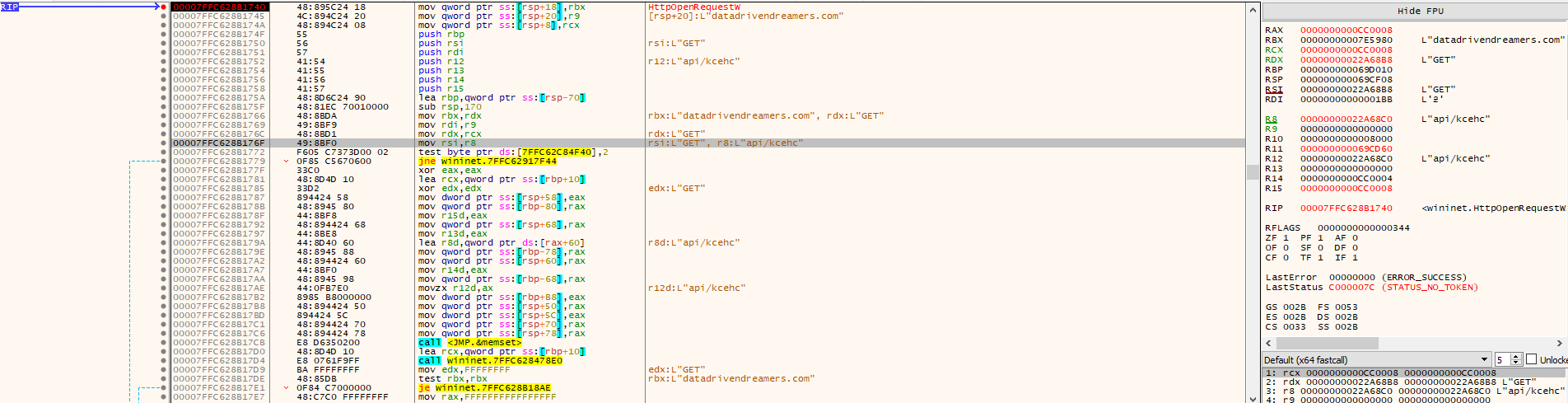

The traffic itself is TLS-encrypted, so the actual content of the requests and server responses cannot be inspected directly.
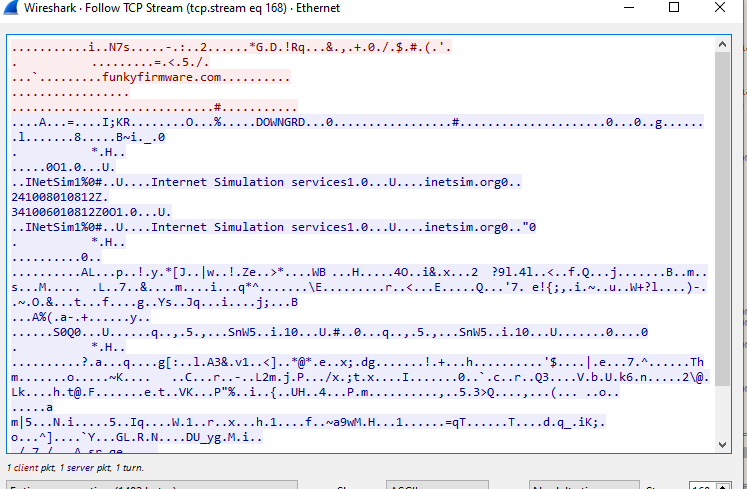
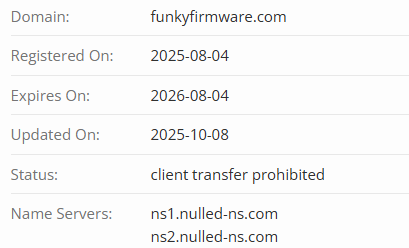
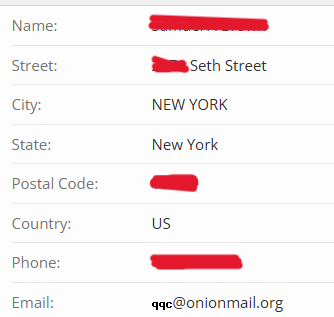
The /api/check behavior reads as a health or availability check , the binary appears to be verifying whether the remote server is reachable and responsive before proceeding. Given that it never appeared to receive a satisfactory response during the analysis session, the connection loop repeated continuously. All four domains share a consistent registration profile: purchased through PublicDomainRegistry as the registrar, with registrant details that appear to be either fake or stolen profiles, all using onionmail.org email addresses for anonymity. Same name servers used except for datadrivendreamers.com domain.
IOCs
d2d6c8e73ac2fa79597f47453e7f0a135eafdda26683b0a67bafabeaa2f9d495funkyfirmware.comdaringdatadaredevils.comcyberneticodyssey.comdatadrivendreamers.comrpp_dl_19_3.dll
TTPs
| Tactic (ATT&CK) | Technique ID | Technique Name | Observed Behavior |
|---|---|---|---|
| Defense Evasion | T1036.001 | Masquerading: Invalid Code Signature | Binary is signed by Bi-Test LLC while claiming to be a Microsoft library |
| Defense Evasion | T1036.005 | Masquerading: Match Legitimate Name or Location | Binary spoofs Microsoft.AspNetCore.Cors identity via fabricated metadata |
| Defense Evasion | T1027.002 | Software Packing | Runtime unpacking into RWX memory conceals actual payload from static analysis |
| Defense Evasion | T1622 | Debugger Evasion | Repeated cursor position polling to detect automated/sandbox environments |
| Defense Evasion | T1129 | Shared Modules | Dynamic API resolution at runtime to avoid revealing capabilities in import table |
| Execution | T1218.010 | System Binary Proxy Execution: Regsvr32 | DllRegisterServer export used to trigger execution via regsvr32.exe |
| Command and Control | T1071.001 | Application Layer Protocol: Web Protocols | HTTP GET requests to /api/check endpoints across four domains |
| Command and Control | T1573 | Encrypted Channel | C2 traffic is TLS-encrypted; content of requests and responses not recoverable during this analysis |
Conclusion
OysterLoader's Stage 2 payload is a study in layered deception. It presents itself as a Microsoft .NET library, carries fabricated metadata from end to end, and looks like a graphics utility when opened in a disassembler. None of it is real. At runtime, it unpacks its actual code into RWX memory, resolves its API dependencies dynamically to stay off static scanners, and begins cycling through four attacker-registered domains, hitting each one three times via HTTP GET requests to what appears to be an availability-check endpoint. The infrastructure was purpose-built for this: all four domains were registered through the same registrar, on the same day using anonymized onionmail.org addresses. OysterLoader thrives on trusted infrastructure abuse, fabricated identities, and System Binary Proxy Execution. By using regsvr32.exe as a middleman, the malware tricks a trusted Windows process into executing malicious code that only materializes in memory at runtime.
What it did not do, at least not during this analysis, is complete that handshake. The remote servers were probably already taken down, which made it loop without progressing further. The runtime payload that gets unpacked into those RWX regions was not fully recovered, and that is where the real answers live, what gets executed if the C2 actually responds, and whether the persistence mechanism through DllRegisterServer ever fully materializes. That requires deeper reverse engineering work, my skills are not there yet but work in progress.
What this analysis does confirm is that OysterLoader is consistent across both stages: abuse of trust in legitimate software, fabricated identities, and infrastructure designed to blend in. Verify the hash against what the vendor publishes, check the digital signature, and if either of those does not match what it should, stop there. Double check domains you install software from for any typosquatting and check file metadata for software downloaded.